I used to feel uneasy when I had to have a larger than usual class in K-3. With my new tools, I look forward to these times. It gives me an opportunity to learn how to integrate the Activboard, Activotes, and Discovery Streaming into the school day. I hope that someday I have more Activboards in the school and want practical, first-hand knowledge of what can be done.
Book Fair Schedule Change
I had the entire first grade in the computer lab today. They will be going to the book fair tomorrow. Usually half of the first grade is in my lab while the other half goes to the library. The next day, the students switch and I have the half who went to the library.
What To Do?
I started by browsing Promethean Planet. I was specifically looking for a lesson designed for K-2 with Activotes. I downloaded a few lessons, but the one that caught my eye was called Discover Reptiles by Nicole Glover of Kentucky. It got my attention because I was certain that I could find a complementary video on Discovery Streaming. Reptiles are fascinating creatures. I headed over to Discovery Streaming and was not disappointed.
Discovery Streaming Reptile Choices
 There were a tremendous number of choices. As you can see from the image on the right, there were 44 video clips just in the K-2 grade range. I previewed about five.
The first video that fit my need was Animal Groups: Beginning Classification (copyright 2000). I liked it because it talked about all the vocabulary in the Activstudio flip chart: turtles, lizards, crocodiles, snakes, vertebrates, scales, cold-blooded. It was a one minute 54 second clip.
The second video I chose was The Jeff Corwin Experience: Wild Animals in the City (copyright 2005). In one segment in New York, they show how a snake was left behind in an apartment and had to be collected by the animal control department. It was a ten minute clip, but we only watched the first few minutes.
Running the Class
When the students arrived, they sat in a horseshoe around the Activboard. I reviewed the Activote and explained that everyone would have at least two turns working on the board. We would write, erase, or move things on the board. I modified the original flip chart. Several slides were changed from "reveal" type items to Activote questions.
This was the second time they used the Activotes, so I made the first few questions very easy. I focused on having the students click A, B, C, D, or E to identify the snake, crocodile, turtle, lizard, and iguana. Next, the students slide vocabulary to where they thought it belonged in different sentences. They must have worked on the concept of reptiles. They were aware of the concept that reptiles are cold-blooded animals. Afterward, students erased a block to reveal the actual answer.
Next, we watched the first video and filled in the blanks about different animals on the board. Other students clicked to reveal the answer and compare it to what was written by the previous student. Before moving on to the Jeff Corwin video, I needed to review some vocabulary: rural, urban, and suburban. Those words all came up in the clip. We used the Activote to determine if the students felt we were from a farming (rural) or big city (urban) area. I talked about the word suburb and how it applied to our area. I asked who had traveled to New York and Miami.
Finally, nearing the end of our 42 minutes together, we watched the snake being bagged in the New York apartment.
Looking Forward to Opportunities
I am looking forward to more opportunities to gather the students around the Activboard and use the Activotes and Discovery Streaming. It is a great combination of products. My hope is that I will eventually have more classrooms with boards and I will have a personal understanding of what can be accomplished with students. I know the children had a fun learning experience.
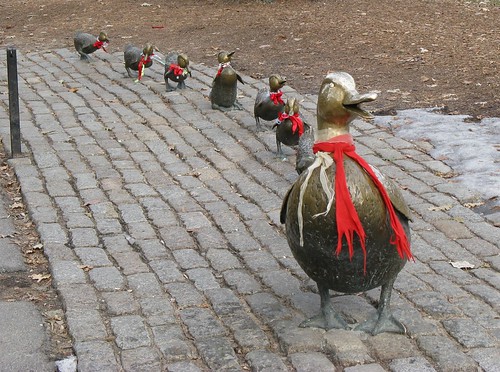
 What a difference a year makes! Last year, I found a Make Way for Ducklings Google Earth Tour at the Google Lit Trips web site. I used it with the first grade students during our modified class schedule during Terra Nova testing week. I've given the lesson an upgrade.
New Year/ New Tools
This year, I have an Activboard, Activotes, and Discovery Streaming thanks to the CDWG/ Discovery Win a Wireless Lab sweepstakes. Enter NOW! Go ahead, I'll wait. You can enter once per day from January 3 to May 1, 2009.
I decided that for our modified schedule, I'll like to find something interactive for all the grades. I'm going to try this lesson with Kindergarten to third grade. Since I couldn't find anything at Promethean Planet, I decided to write my own flip chart. It's a great experience. I have one photo that I am waiting to receive permission to use and then I'll upload these charts as a resource.
Discovery Streaming
I signed on to Discovery Streaming and typed Make Way for Ducklings. I was happily surprised to find a 1969 movie version of the book. This is going to be a big improvement on last year's class when I had a student hold the book while I read from a copy.
As are most streaming clips, this eleven minute movie is broken into four smaller segments. I downloaded them to the hard drive. I don't want to have buffering issues and I don't want to have a failed lesson because the Internet is unavailable as it was after a wind storm a few weeks ago.
Activstudio/ Activotes
Next, I wanted to build a set of Activote questions that would lead us into the story, the movie clips, and the Google Earth tour. I've exported the flip charts into PowerPoint slides which I've placed on Slideshare. I'll link to the flip charts on Promethean Planet when I place them there.
I have questions asking about the use of Google Earth at home, the Caldecott symbol on the cover of the book, and which part of the Earth the students believe they would find Boston.
I have slides to introduce each video clip. Those slides are followed by a few comprehension questions about the story, and then a slide to transition to Google Earth.
Part 1 of the presentation:
Part 2 of the presentation:
To Be Presented
I will be working with these flip charts next week. I only have 30 minutes with the students. Some of the students have not used the Activotes yet. As I have more insight into how the project idea works, I'll report it back on this blog.
Image Citation:
"Make Way for Ducklings." Mr. Ducke's photostream. 2008 Jan 6. 2009 Feb 28.
http://farm3.static.flickr.com/2363/2173283522_657b7ac45a.jpg?v=0
 Last week, we had our day with a team from CDW/G, Discovery Education, and Hewlett-Packard. Winning the Wireless Lab Sweepstakes has really been great in every way.
The Big Rollout
We had five sessions with students from the fourth through eighth grade and our guests. Each session lasted about 45 minutes. First our host Mary from Discovery Education told the students a little about the contest. She introduced a library specialist, Pam, who traveled up from her school in Maryland to talk about Discovery streaming. She gave a brief overview of what type of content the students could see when their teacher found useful videos for their subjects. Our guest from Hewlett-Packard, Wayne, gave a short overview of how the stylus and Windows Journal worked on the tablet to write. He showed them the Snipping Tool application and created a quick document that converted written print to typed text. The students ended up with about 20 minutes to play around in groups of two.
First Follow-up Technology Class
One of the things I like to do with students is give them free time on equipment and software before we get into its scholastic use. During class one this week, I told the students that I had three goals: to have them start the machine and set it up as a tablet, open - use - and close a variety of programs, and shutdown and stow the tablet. These goals were aimed at the fourth to eighth grade students.
They were limited to using a folder with items called PowerToys for Tablet PC. I learned about this set of free tools from Kathy Schrock. They are great for getting exposure and comfort with the stylus.
Their hands down favorite is Microsoft Physics Illustrator for Tablet PC. It gives students the ability to set up closed shapes, connect them with rods, and set a force on an object or objects. They can play back their creation and see how it operates.
Second Follow-up Technology Class
Our Spanish teacher is very excited about have a traveling lab of 20 wireless tablet PCs. I know she will be using our Discovery streaming and will be asking them to accomplish some writing tasks. Our goals for the second class was to learn to start and use the Open Office Writer program.
I explained the reason for using Open Office versus Microsoft Office. We did not have money for software for the tablets, so I chose to use open source software. It is a great example to the students. We do not simply use software that we haven't paid for. If they have computers at home and wish to use Microsoft Office, but cannot pay for the student edition, they will have a new option.
I played a short clip on Discovery streaming, the song La Bamba. The words to the song were on the screen. I gave the students the option of just listening or singing along. Next, I presented them with the text of the song on paper. I needed to make sure they could insert characters with accent marks. They learned how to select Insert - Special Character... from the Writer program.
Lessons Learned This Week
First - the machines are set to Auto Update. This would not have been big problem, but the machine grayed out the option to "do this later". So, whenever it popped up on the screen, we had five minutes to quickly save before the machine restarted. It would have been fine if it happened to one student, but it was slightly harder with five fourth graders having this problem at the same time.
TO DO: Turn off Auto Update.
Second - The battery life is great. We shut down the computer between classes and I almost made it to the end of the day without the need for electrical cords. The last class of the day four fourth graders screens started going dark. I had to quickly grab plugs from the cart and get them plugged into outlets. It was hard for the students waiting for assistance.
TO DO: Teach the students how to check the battery life when they start the computer.
Third - There is a little light sensor. It darkens the screen when the student's arm goes over it. It is on the lower right of the screen, so most righties had to get used to keeping their arms out of the sensor's way.
TO DO: See if I can change the sensitivity.
Fourth - The screen should be able to orient in portrait or landscape mode, but it wants to force itself into portrait mode when it is set up as a tablet.
TO DO: Learn how to change the orientation so it sticks.
The Primary Students
The first through third grade students did not attend the big rollout. This week, I showed them the tablet and gave them time to play with Tux Paint. They really liked the program. I will have to bring down the tablets from the second floor every few months to get them used to the tablet. I will have to find some lessons that will provide them with more than just play time.
Next Week
I was going to put the tablets premanently on the second floor next week. I still don't feel like the students will be entirely comfortable without my backup. They need to become the ambassadors to the teachers. I will have to provide two more lessons next week. This will give me the opportunity to make sure the TO DOs on my list are address and learn what else will be required to make them self sufficient.
Image Citation:
IT News SK: http://www.itnews.sk/buxus_dev/images/2006/Microsoft_Physic_Illustrator_velky.png
 There were a tremendous number of choices. As you can see from the image on the right, there were 44 video clips just in the K-2 grade range. I previewed about five.