Showing posts with label states. Show all posts

Wednesday, May 12, 2010

The Great Mail Race and Other State Research

Last year, a third grade teacher asked me to help her with something she had read about. It was called The Great Mail Race. After some research, I learned that it is a postal mail project. We combined it with some general state research and built more onto the project this year. I want to share what the third grade has learned and how I helped to build the lesson.

Research Using Online Tools
The first step was to learn about online research tools. I wrote a post about the work back on the 25th of April. The following week, the students used the Fact Monster web site to find basic information about their state such as the government, land area, population, state flower, state bird, three largest cities, and state nickname. They had to choose a state that they had not yet visited. We had a good discussion about square miles versus square kilometers, how to determine which city was the largest, and what a governor does in a state.

State Tourism
At the end of the lesson, the teacher thought it would be interesting to have the students find some places they could visit if they took a trip to the state. We only have 42 minutes, so I created a list of national parks, zoos, museums, waterfalls, and buildings and structures by state on a wiki.

As the students took a tour of their state, they had a worksheet to help them think about what they were seeing. In addition to their name and the name of their state, the form includes the following questions:


1. What is the name of a national park that you could travel to in your state?
2. What is the name of the zoo for your state?
3. Does this zoo look like an interesting place to visit? Why?
4. What is the name of a museum for your state?
5. Does this museum look like an interesting place to visit? Why?
6. What else was listed for your state?
7. Would you like to visit this place? Why?

The Great Mail Race
Finally, the students are going to choose a Catholic school in their state and send a letter to a third grade class in that school. I had never heard of the Great Mail Race until last year. The students sent a letter telling a little bit about our school and asked the partner school to fill in a form with questions. Here is an example I found using Google and the search terms: the great mail race questionnaire. 

Last year we searched for school addresses using Find a School-NCES Kids' Zone. It worked well, but felt very random. The students didn't know anything about the school they chose. This year, I researched two school choices for each of the students and posted the address and a link the the school's web page. I was especially looking for colorful school web sites. The students looked at the web pages for both schools and decided which school they would most like to send their letter. Next they copied the address on a sheet of paper to bring back up to the classroom. They will fill in the letter to the partner school, address the envelope, and take a walk to the post office to mail the letter.


Finally, it's a race to see which school will be first to reply to our third grade students. As the letters come back, they mark the location on a map of the United States. Overall, it is a really nice way to learn more about our fifty states.


Image Citation

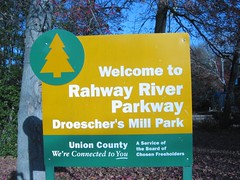
Oro, Ann. "County Park Sign." njtechteacher's photostream. 24 Nov 2007. 12 May 2010.
http://www.flickr.com/photos/njtechteacher/2059972147/in/set-72157601439024372/

Sunday, April 25, 2010

State Research: Learning to Use Keywords in a Search Engine

In third grade, the students complete a state research fact sheet. Usually, I take the students directly to a web page to work on the research. This year, I began laying the groundwork for successful search strategies.

My Resource on Promethean Planet
I've uploaded a set of flipchart pages to Promethean Planet. I was worried that teachers who do not have an ActivBoard would be excluded from using the resource. There are two ways you can use this file on your computer - even without a board.


First, you can download a personal edition of ActivInspire. Go to the Promethean Planet web site. Sign up for a free Promethean Planet account by clicking Register. Go to the download page.

Second, you can dowload the free flipchart viewer. I am not sure if this is just for old ActivPrimary and ActivStudio files or the old flipcharts and the new ActivInspire charts.

Once you have an account, you can download my resource file.

Working Through Search Engine Concepts
First, I introduced the students to the facts that they would be finding on the worksheet. We used the state of New Jersey as the example. Some students already knew the state capital. Most know the state bird after our work earlier in the year.


Next, I asked them how a third grade student could learn the details about their state such as the land area or three largest cities. The students knew they could look in a book or go to the Internet. Page two of the flipchart allows the students to drag those hidden images from behind a U.S. flag.

With that information in mind, students took turns dragging six search engine names from behind an image of a computer. The list includes Google, Bing, Ask Kids, Yahoo Kids, Fact Monster, and Kids Click! As each image was dragged from behind the computer, I had the students who have used that web site stand up. Getting students moving during a lesson is always helpful. It's an easy way to build some movement into a lesson.

Part of the lesson is learning about key words. Before starting to get this idea across, I wanted the students to focus on how they use a search engine. I have noticed over the years that some students tend to type in questions or long sentences. The fourth slide shows the
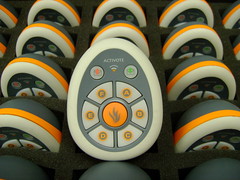
question: What is the population of Iowa? We used the ActiVotes to find out how many students type a whole sentences, short words, or sometimes both.

With that information in mind, we begin discussing key words that could be used to find the information on a search engine. I kept reminding the students of the individual items they needed to find and the state name. For example, "Remember we are looking for the population, land area, three largest cities, governor, and state flower of New Jersey." Once we had many keywords listed, I pointed out that they would have to complete the search nine times to find out all the details. If their teacher gave them two states, it would take about 18 searches.

On flipchart page six, I asked the student if they thought the words state research would be helpful keywords. They used the ActiVotes to agree or disagree.

We looked at some top results for the key words. We found that there are several web si
tes that would allow us to type in a state name and locate many facts.

But I Don't Have ActiVotes...
I think the ActiVotes are a great way to involve the students in a lesson. If you do not have them, there are a number of ways you can have the students respond. You could give them a red, yellow, and blue index card to represent A, B, and C. You could use dry erase boards. There are a number of options electronically including PollEverywhere with a web link.

Resources I've Located

The students are going to have a choice of six web sites to complete the research. I think the Fact Monster web page will be the quickest for my students, based on what their teacher wants the students to learn. As I was setting up the ActivInspire flipchart lesson, I came across a few other sites that looked interesting. These include Stately Knowledge, State Facts for Students via the US Census Bureau, Enchanted Learning's State Page, and 50 States.