So often school projects require the students to research a topic within a narrow range selected by the teacher. For the last two years, I have had the seventh grade students submit a proposal for a topic they would like to research. The results have been worth the effort. This year, I tied the results of their research into what they learn about authority, bias, content, and usability as sixth grade students.
General Project Guidelines
I ask the students to write a short paragraph explaining the topic they are interested in researching and why they would like to do the research. It is not a simple task for a seventh grade student. Over the last two years, my students have researched a variety of topics including photography, animal habitats, sports, and hobbies.
Once the topic is approved, they receive a Google Doc with a series of questions to guide their research. Each question will eventually turn into a slide in a presentation to be created in Open Office.
Slide 1: Topic introduction - what is the topic, why did you choose it, who else might be interested in the research you gather
Slide 2: What did you know about the topic before you began your research
Slide 3: What is one specific thing you wanted to find out and what did you learn
Slide 4: Continuation of the one specific thing and what was learned
Slide 5: What is a second specific thing you wanted to find out and what did you learn
Slide 6: Continuation of the second specific item
Slide 7: Wrap up - what other questions did the research bring to mind, in what other ways did your knowledge increase, who else will you share your knowledge with and why
Search Skills Refresher
Over the course of the previous years, the students have been working on skills with Sweet Search and Google. We learned how to construct a query to get the best answer to a question by including quote marks in the query and thinking about the words that would appear on a page that had the best answer.
The students used their Diigo student account to bookmark relevant pages. They must always find the content first. Some students need to be steered away from daydreaming by paging through images (depending on their research topic).
Once they find the content, bookmark it in Diigo, and type their answers into Google Docs they may start finding images for their presentation. The students continue to need direction in bookmarking the actual page containing the image. Some students bookmark the Google search result.
By keeping the research results in Google Docs and the bookmarks in Diigo, I am able to easily check up on their progress from any location that has Internet access. The students are able to move to different computers and still have access to all their content.
The presentations reinforce the skills of presenting to an audience, being a good audience member, and designing slides that rely on images for the audience and speaker notes for the presenter.
Extending Analysis of Web Page Content
This year at the conclusion of the presentations, the students were required to go back and look at the pages they bookmarked for content. We reviewed the concepts of website authority, bias, content, and usability. The students reported on up to five websites they used in their research and listed the strengths and weaknesses of each. It gave me useful feedback on where the students are growing or needing practice in evaluating websites. This is a link to a PDF sample of a student's analysis.
Student-Created Project
This analysis led to a project request by a student. They thought it would be interesting to read the Terms and Conditions on a website and create their own terms and conditions. I selected Facebook, Tumbler, and Twitter since the students often have one or more of these types of accounts. First they chose to open a document with a copy of the terms and conditions. They worked with a partner to highlight sections they did not understand. They colored the font of those entries in red. They highlighted sections they wanted to include in their own terms and conditions and changed the color of the font of those words to green.
They really enjoyed creating their own terms and conditions document. The idea was to then have the eighth grade students read their terms and conditions and agree or disagree to them in order to "use" a website. We ran out of time to complete that part of the project. I will do this in September of the 2013-2014 school year. We will then analyze how many students really read the terms and conditions and how many just click agree. We will probably do it with a Google form masquerading as an actual terms and conditions page.
Overall Results
I do believe the students are becoming more critical thinkers in the selection of websites for research. I will continue to help them build their skills next year.
Image Citation:
Creative Commons Attribution-NonCommercial-ShareAlike
http://www.flickr.com/photos/32625013@N00/3312537516
Paula Bailey
 How can you make a pitch for technology and make the message stick? This question has been burning in my mind as I work with some new equipment over the summer. Along the way, I found the book Made to Stick by Chip Heath and Dan Heath.
AVerMedia Document Camera/ Visualizer
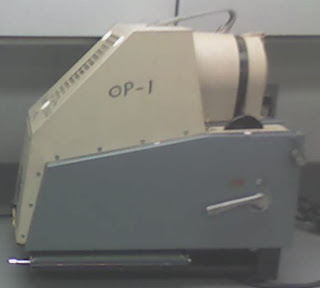
One of the new pieces of equipment is a document camera. Up until recently, I hadn't heard much about these products. When the AVerMedia CP130 arrived at our school at the close of the 2007-2008 year, I wasn't certain who might choose to use it but I saw a lot of potential. Back in the "old days" when I was in grammar school, the nuns used opaque projectors (see image) to resize drawings. I had forgotten about them until I saw our art teacher using one to project some lettering on the wall of the cafeteria. The document camera is the same in concept with the added feature of being able to capture the image as a JPEG or a movie. I've managed to collect a few ideas in delicious already.
Selling the Idea to Our Faculty
My initial plan was to take five minutes at the faculty meeting and have everyone make a cootie catcher by following my hands via the document projector. I was going to equate it with an overhead projector that does not require a transparent object. I would then let everyone know they could come back to my room to take a closer look.
Made to Stick
The book has been leading me through six steps. These steps have the potential to make the idea of using the document projector in the classroom survive the five minute demo. The idea should not only survive, but I should end up with a much better presentation. Once the idea survives the demonstration, the teachers should be more likely to consider using the equipment as a part of a classroom lesson.
The Main Points
I am currently reading and thinking through the fifth of six points. The main concepts are that an idea needs to have:
- a simple message
- an unexpected attention getter
- a concrete example
- a believable idea
- something that will cause people to care about the idea
- a story to get people to act on the idea
I have been capturing my thought process showing the change from my initial instinct through my final presentation plan. If you are trying to "sell" an addition or modification of an idea this book is for you! Take time to get the book from your local library or bookstore. I believe it will give you some new tools. It might also remind you of advise you have heard before. In the end, you will have a much stronger presentation.
Image Citation:
"Progress? The trees don't think so." obscuracamerareferen ca's photostream. 2006 Oct 9. 2008 Jul 9.
http://farm1.static.flickr.com/98/264635283_73e7101319.jpg?v=0
 I plan on introducing "Technology in Education" to a few different groups of teachers over the winter months. My broad outline is here on this wiki. I'm working on finishing it up over the next few days.
I want to show the teachers how they can working with students through using the tools themselves. I plan on blending some of the "standard" movies that many of us have seen online with the use of online survey tools, wikis, and blogs. I will be using the videos as "commercial breaks" as Scott Elias describes in his Slideshare presentation. I found it through Patrick Higgins' Chalkdust blog post.
I'm also trying to model some of the exercises that the group has gone through over the past few months: Think-Pair-Share, Carousel Brainstorming, Jigsaw, and Individual Reflection -- with a computerized twist.
One of the tools I plan on using to open the session is this SurveyMonkey questionnaire. I want to be able to do two things: 1) give the teachers hands on experience with the tools 2) be able to get a quick read of the group to focus our attention.
I'd be very appreciative if you would take the survey (it's a copy of the one I have for the various groups) and let me know if you think something is glaringly (or not so glaringly) missing. For example, in question 1, what category would you put Skype in? Is Yugma a different variety of Skype (similar to Twitter/ Pownce)? I've never used either.
Image Citation
Faber, Henry. "Survey says...". hfabulous' Photostream. 31 Aug 2006. 27 Dec 2007.
http://farm1.static.flickr.com/73/230444653_5dec120f88.jpg?v=0