This post continues the theme of my last five posts about teaching web search and evaluation skills from Kindergarten through eighth grade. Another important skill set involves understanding the deep web.
The Deep Web
We begin by discussing what the students know about icebergs. Their common explanation is that there is more iceberg underwater that what appears above the surface of the ocean. My explanation to the students in sixth through eighth grade is that there are resources available only if you have a public library card. The Internet is like an iceberg. What Google, Bing, or any other search engine shows is much smaller than what is available. In the state of New Jersey we have access to Jersey Clicks. It is a website that verifies your membership in a public library and gives you access to EBSCO search.
I walk the students through Primary Search, Middle Search Plus, and Academic Search Premier. I explain that we will see results from magazines in our Jersey Clicks work. Magazines usually require a paid subscription. As a service through the public library we can view the articles online. The students in middle school have to read scientific articles for a report each trimester. With this example in mind, we search for electric automobiles.
EBSCO Search
It is very important to help the students locate the full text check box on the search screen. If they do not check the box, they will receive results that include items that cannot be read online. Once we view the results page, we look at the difference between HTML Full Text and PDF Full Text results. The major difference is that the PDF files are generally like scanned images of the magazine pages.
In Primary Search they will see magazines like Boys' Life, Science World, and Science News for Kids. The content is appropriate for middle school students and elementary school children. In 2013 we found 56 entries for electric automobiles. Middle Search Plus located 906 entries. Its results come from magazines such as Time, Popular Science, and Discover. The reading level is much higher than the results from Primary Search. Finally, Academic Search Premier contained 3,849 results. It includes academic papers in addition to more complex magazines such as New Scientist, Futurist, and Kiplinger.
Follow Up Activity
This year, Margaret Thatcher had died the week before we completed this lesson. I had the students find three resources in Google and three from Jersey Clicks. I provided the students with the following prompts in a word processor document. They turned in their completed research as an Edmodo assignment.
- How many entries are there for Margaret Thatcher in the Primary Search?
- How many entries are there for Margaret Thatcher in the MiddleSearch Plus?
- How many entries are there for Margaret Thatcher in the Academic Search Premier?
- How many entries does Google give you for Margaret Thatcher?
- How many entries does Google give you for “Margaret Thatcher”?
- What is the difference in the types of articles you get between Primary Search and Middle Search Plus?
- What is the difference in the types of articles you get between Middle Search Plus and Academic Search Premier?
- What is the difference between Jersey Clicks and Google?
- When might you use Jersey Clicks instead of Google?
- Tell me three things you found out about Margaret Thatcher in Jersey Clicks.
- Tell me three things you find in Google.
We held a class discussion following the research. They understood that they could receive more factual, targeted answers through Jersey Clicks. They were able to quickly see what Margaret Thatcher looked like in Google. The found 6 Primary Search, 292 Middle Search Plus, and 1,260 Academic Search Premier results and over 38 million Google hits.
The end result is that the students recognized that they authority of the articles was much greater for Jersey Clicks/EBSCO and that they could go there for trusted research.
Image Citation
Mjöbäcksvillan Barnaby Iceberg, Family Barnaby
http://www.flickr.com/photos/80120017@N03/8010607983
Creative Commons Attribution-NonCommercial-ShareAlike
 I wrote a post about increasing skills in selecting from web query search results in March 2011. I continue to refine the investigation every year. This year instead of setting up twelve preselected websites I presented the class with a prompt. I asked the students to try to find the best website to learn who started the Academy Awards and the date of the first awards show.
Learning to Use Social Bookmarks
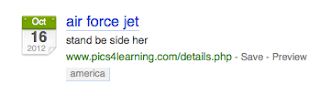
In the fourth and fifth grade, the students bookmark websites in Firefox's Bookmarks tool. The bookmarks are placed in a folder but they are locked into whichever machine the students used when they bookmarked the site. I create student accounts through the teacher console in Diigo. The students create a music video using Creative Commons licensed music. They use Pics4Learning to interpret the song through images. They bookmark the pictures in Diigo and learn how to give the bookmark a title (in this case a name that will remind them of the picture). They enter a description for the Diigo bookmark (in this case what lyrics in the song they will use with the image). Finally, they enter a tag (this year it was America for the song God Bless America). We post their final video with citations in Vimeo. Over time the videos have included God Bless America, America the Beautiful, He Got the Whole World in His Hands, and Go Tell It on the Mountain.
I wrote a post about increasing skills in selecting from web query search results in March 2011. I continue to refine the investigation every year. This year instead of setting up twelve preselected websites I presented the class with a prompt. I asked the students to try to find the best website to learn who started the Academy Awards and the date of the first awards show.
Learning to Use Social Bookmarks
In the fourth and fifth grade, the students bookmark websites in Firefox's Bookmarks tool. The bookmarks are placed in a folder but they are locked into whichever machine the students used when they bookmarked the site. I create student accounts through the teacher console in Diigo. The students create a music video using Creative Commons licensed music. They use Pics4Learning to interpret the song through images. They bookmark the pictures in Diigo and learn how to give the bookmark a title (in this case a name that will remind them of the picture). They enter a description for the Diigo bookmark (in this case what lyrics in the song they will use with the image). Finally, they enter a tag (this year it was America for the song God Bless America). We post their final video with citations in Vimeo. Over time the videos have included God Bless America, America the Beautiful, He Got the Whole World in His Hands, and Go Tell It on the Mountain.
They continue using Diigo to bookmark images for their Dinner with Guests presentation. The students do not share the bookmarks with classmates in this grade level. They are just getting used to the idea of signing on and saving bookmarks. They can use Diigo from home or school for any project.
Deciding Between Web Queries
The next project builds on the fifth grade queries they practiced in order to write reports. As I noted in the opening to this post, I asked two classes of sixth grade students to find me the best website answering the question about the Academy Awards. There were a wide variety of responses. I labeled them A-L and posted them as tiles on a Symbaloo page.
I broke the students into four groups of four to five students. Each group received a job sheet and a grid to analyze their assigned sites.
Authority, Bias, Content, and Usability Experts
Each student takes on an expert role after I walk them through the job sheets. As an example, I use Google to search for "george washington" biography. It gives us a way to tie into what was learned in the fifth grade about using quotes around search terms. I selected this George Washington biography which came up fifth on the list and a second biography which was first on the list. We kick off the discussion with my question, "Why does Google list the links in this order?". The answers range from "it is the best answer" to "someone paid for it to be there" to "I don't know".
I shared information about how Google looks at the title of the web page, the URL, and how many times your words appear on the page. There is a great short video by Google about this topic on YouTube. We did a search for Jet Blue Airlines to see what an ad looks like as opposed to an unpaid search result.
We look at the job of the content specialist. This person finds the strengths and weakness of the page based on how understandable the content is to a sixth grade student. They see if they can find out when the work was updated or created. They think about whether they would find better information in a book or encyclopedia.
The bias/purpose specialist finds the strengths and weaknesses of the site based on the purpose of the site. They think about why the site was created: to discuss, sell, promote, or parody information. We talk about the meaning of the domain of websites: .com, .org, .edu, .net, .gov, and country codes. We learn about personal webpages within sites that contain a tilde (~).
The usability/design specialist concentrates on how easy or difficult it is to maneuver around the site. They see if other links work or are broken. They look for grammar and spelling errors. They determine how well laid out and easy it is to move around the site.
The authority/credibility specialist has the most difficult job. They try to learn about the author of the site and their credentials. They try to find out who owns or sponsors the site. We learn to truncate the URL by cutting back from the starting site and removing part of the website address until we can determine who wrote the site. In the example from George Washington we started out with the original URL.
http://www.oswego.edu/library2/archives/digitized_collections/granger/georgewashington.html
http://www.oswego.edu/library2/archives/digitized_collections/granger
http://www.oswego.edu/library2/archives/digitized_collections
http://www.oswego.edu/library2/archives
http://www.oswego.edu/library2
http://www.oswego.edu
As the URL is cut back to a smaller URL by removing the rightmost / and the words that follow it, the students can find out more information about who wrote the website. I point out that sometimes they might receive a message that they are not allowed to access that portion of the site. They can continue trimming the URL and they will again see more information.
The authority specialist also tries to find out who links to the website with a Google option:
link:http://www.biography.com/people/george-washington-9524786
We look to see if every link is from the main parent website (biography.com) or other sites. We see if there are a few links or many pages.
The students self select jobs by choice or rolling a die. The student who rolls the highest number gets first choice of job and so on.
Solo Work and Group Work
Students work independently to look at six websites and evaluate the site based on the job sheet. The type their analysis into a document with a chart. Once they are finished, they rank the sites from 1 to 6 with 1 being the best site and 6 being the worst. As they finish, they see if their partners need help analyzing the sites from a different perspective. Finally, all group members come together to decide which was the best site overall and which was the worst.
When all analysis is complete, I call the teams up to the front of the room. Two different groups (which I call Group 1 and Group 3) analyze sites A-F and two other groups (2 and 4) have analyzed sites G-L. It is interesting to hear the students explain from the four different perspectives why they selected their site as the best. After group one presents their evidence, group three has a minute to ask clarification questions. Group one then has a minute to confer and respond. It was most interesting to find that the students in one class had chosen the same site as best in one group and worst in the second group. The search result in question was from the Wikipedia.
My Goal
I want my students to really start thinking about how to not only choose search terms but the merits of choosing one result over another.
It is time for the Daughters of the American Revolution (DAR) essay contest. This makes it the perfect time to review Internet search strategies. As I was preparing, I took a look at a presentation I worked on about three and a half years ago. The changes in how I present and how the students interact with the information has changed for the better - I think.
The 2009 Version
Although I loaded the screens up to Slideshare, these are JPG exports from the Promethean board.
Slide 1
I started with an image and a quote. It got their attention. The sixth grade, overall, felt like this was a false statement. Most students felt that books were easier to use when finding information. They felt that they often could not find what they were looking for when they used a search engine.
Slide 2
I wanted them to be taken off guard with regards to purpose. I found an image and cut the baseball bat out. They volunteered some purposes for the bat - from hitting a home run to hitting aliens in a video game.
Slide 3
We talked about seeing something out of context and how the big picture changes your opinion.
Slide 4
I had a screen shot of a Google search result for the words transcontinental railroad irish. The DAR essay is "The Completion of the First Transcontinental Railroad". I only wanted the first five entries.
We worked on figuring out Google's results based on what was typed in the search box. You can see from the different colors on the screen what the students were focusing on. We flipped back to this slide a few times as we built the concept.
Slide 5
We looked at the image and I talked about the fact that there could be 12 people outside the hotel room door, but they are out of view. When we flipped back to slide 4, we found there were over 45,000 search results, but we were only looking at the first five. What if entry number 20,000 had just what we needed? How could we find it easier?
Slide 6
I explained that over the next few Fridays, I will share tips and give them time to practice searching. Today's tip was going to focus on the website URL. We flipped back to slide four. I pointed out the URL and we talked about the three parts of the web address. Many start www. It is followed by a word of some sort. It ends with an extension. Sometimes they are three letters, sometimes two.
Slide 7
When I put up slide seven, it initially only had the magenta letters. The students took turns volunteering their knowlege. Sometimes it took a few students to build the whole answer, e.g., .EDU.
Forty-two Minutes Passes Quickly
I just got to slide eight when the bell was ringing. Next week, they are going to go on to their computers and try a Google and Altavista search for transcontinental railroad irish. The will report on the first five results. For each entry, they will list the link title, what they can tell about the website from the domain name, and they will look at the page and try to determine if the information would be helpful in their DAR research.
The will then search for their specific topic for the DAR essay to look for a detail they could use in their paper. Write the search engine name they use (Google, Altavista, something else) AND the keywords they searched for.
The following week, we will take their search queries and analyze what they are requesting from the search engine based on what they typed as a query. It should be interesting. I'm generating some ideas to get that accomplished.
As a Comparison
Here is the same basic information I provided to my older son's class three and a half years ago. I know I prefer what I did this year. Even if I didn't have a Promethean board, I still could have accomplished the same basic lesson.


