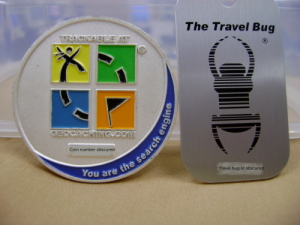
 We had a great Skype call Wednesday evening. About half of my seventh grade students returned to the school at 6:30pm to speak to a combined first and second grade class in Australia. We are going to try to send a geocoin from New Jersey, USA to Victoria, Australia via geocaches.
Lessons Learned - Ideas to Keep
I sent a permission slip home the Friday before our Wednesday evening call. I asked that the form be returned Monday morning. The form gave all the particulars about the call: who we were talking with, why we were calling, where we were meeting, when we were meeting, how to get in touch with me. I requested the student's name, the name of the person dropping the student off and picking the student up, and a contact phone number for that person.
When school was finished for the day, I made sure I placed all the items required for the Skype call right at my desk. This included a working Ethernet cable, headset microphone, digital still camera, digital video camera, cart with projector and speakers, the geocache box, the geocoin we would be sending, and the permission forms.
I arrived at the school about 20 minutes before the students. I turned on, connected, and tested all the equipment, set up the Promethean board with some pre-work, had a printout of questions with answers that were discussed in class earlier that day, set the video camera on a tripod and checked that it would record, placed freshly charged batteries in the two cameras, and set the chairs in a semi-circle in the room.
Five minutes before students were to arrive, I went to the meeting place which was the outside door closest to the room and began greeting students. The first students to arrive were told to go to the room and answer the questions on the Promethean board.
When approximately half of the expected students arrived, I went back to my room and gave one student the task of reading the "script" for the call. I asked them to decide who would be responsible for each question during the call. One student chose to run the video camera to record the pre-meeting. I returned to the back door, greeted the remaining students and explained what was already happening in the room.
 Ten Minutes Before the Call
I checked with the students to get agreement on who was responsible for each question on the script. I asked if there were any students who did not want to speak. I found out who was using Skype at home and gave a rundown of the Skype program to the rest of the students in the room.
There was an excited buzz in the air. One student asked what would happen if the othe class forgot. I assured the students that the teacher and I communicated via email earlier in the day and we were both ready!
The Call
The students had a great time asking questions, getting answers, and answering questions from the first and second grade students. We showed them the geocoin.
I think a Skype call is a huge step in forging a relationship and interest in an electronic project. The students become "real" to each other.
The call lasted about forty minutes.
Lessons Learned - Ideas to Improve Upon
At the end of the call, there was still time available before parents would return to pick up their children. I asked the students to help me learn what was good about the call and what was bad or needed to be improved.
They were all excited and felt it was a great reason to return to school at the end of the day. They want to do it again.
The first major improvement I learned was that I need to electronically post the details for the evening in the event of lost forms. One student went to my Schoolnotes page and was disappointed that I did not have times and locations listed for the call. This makes so much sense. I don't know why I didn't think of it myself. I'm always misplacing school forms at home for my sons.
The second major improvement is that I placed a sign on the back door to call up to the open window in my room to be let into the building. The student wasn't sure which window was mine. We decided I should hang a banner out the window so it was easy to find. They all agreed that it was hard to tell which room was which from the outside.
It was a great experience. Now to find out how long it will really take that coin to travel over 10,000 miles!
 I'm not sure how long ago I heard about geocaching. From the first time I heard about it, I knew I had to try it with my students. I had my first opportunity yesterday. The image includes my son holding the first cache we found.
Planning, Planning, Planning
This year, I had a bit of money left in the technology funding budget to purchase a Garmin etrex Venture HC. I have no experience with geocaching, so I've been collecting bookmarks for a while.
I kept trying to figure out how to arrange a field trip or a class period or two with the GPS and finally realized that our annual walk-a-thon/ field day would be perfect.
The DEN decided to have a Geocaching Day and in preparation they had a few webinars scheduled. Last week, I sat through the archived event and was really happy with the content. The event was led by Bridget Belardi. She has a nice wiki page on geocaching and it includes lots of teacher resources and her set of slides from the webinar.
I put together a short flipchart in Activstudio to get a feel for what students knew about geocaching, explain the activity, and let students register to try it on the field day.
Explaining Geocaching in the Classroom
I took some photos from the web to show what a geocache could look like. I asked questions like:
- What is a geocache?
- What is required?
- What would you be looking for?
Next we took a look at an image of satellites circling the globe and I helped the students understand the concept of needing at least three satellites to get a lock on your position on the GPS unit.
Only one student had ever heard of geocaching and that same student had found all the caches at this park with his family. A fair number of students wanted to try geocaching at the park.
In advance of the field day I thought I would have to hide a geocache, but was stunned to find someone had already hidden a themes worth of caches. There are seven named after the Seven Dwarfs. Each cache has a number that will lead to the Snow White cache.
The Day Arrives
After a walk from the school to the park, I got out my list of seventh grade students who expressed an interest in trying geocaching. The students were tired from the walk and wanted to sit and watch a baseball game. Some sixth grade students overheard that I was trying to get a group to try the geocaching and wanted to go instead.
As we walked, I explained what we were going to do. They had a lot of fun following the arrow on the GPS unit. I knew, in advance, that the geocaches were all off the path that goes around the park. It took a bit to convince the students that we couldn't simply follow the GPS directions to head west because we would have to walk through a pond.
I was impressed with how well the unit worked! It was a really overcast day and I heard that some GPS units have trouble with cloud cover. This unit worked like a champ. We finally closed in to within 20 feet of the cache. I explained that we may not get a better lock on the location than 20 feet, so we started looking. My son had the unit at that point and actually got within 5 feet of the cache with the GPS.
I was a little worried that the students would get tired of hunting before we found the cache. They were really surprised that I didn't know where the cache was and that a stranger hid it. Luckily, I noticed a hole in a tree and what looked like a film canaster. I asked for a volunteer to reach in and get it. Sure enough, it was the cache. It was hidden in an M&M tube that was covered in camoflague contact paper. Inside was a little pen and a scroll of paper to sign.
They immediately wanted to find another cache. We tried another. This time, it was a really tiny two inch canaster covered in black tape and attached to a tree limb with a twist tie. It took a lot of searching, but armed with the excitment of having found one, they were determined to find this cache.
They would have liked to have found a third, but I wanted to see if I could take another group out. Unfortunately, by the time we got back, it was almost time to walk back to school.
Ideas for Next Year
A lot of teachers were really interested in what we were doing. I want to find a grade level and do a really thorough job of tying geocaching into the curriculum. There are so many ways to do this: longitude and latitude, measuring feet and fractions of miles, compass points, or hiding our own cache with a travel bug inside.
One of the many benefits of summer vacation is the luxury of planning time. I can't wait to do this over the coming years with many more students.
In a previous post, I mentioned learning about an Education 2.0 conference down the street from my home at Kean University in Union, New Jersey. I took away something from each of the two keynotes and three individual sessions. What more could I ask for?
The answer is face to face connections with some really interesting people in some local schools. The other neat thing was meeting Kevin Jarrett who I only just have gotten to know through his K12Online presentation about Second Life. He was kind enough to introduce me to Lucy Gray.
I've taken Lucy's cue and tagged my delicious account with CIE entries for web sites that I found useful over the two days. I'll be adding a few more as I go back through my notes. It took me until the second day to figure out how to use Kean's wireless system. They forgot to announce the guest id and password.
The day started early with breakfast and a keynote speech by Will Richardson. I've read his blog, heard people write about him, and have even left some comments behind at his Weblogg-ed blog. It was a pleasure to listening to him. I found his keynote at the Christa McAuliffe Conference in New Hampshire at Bob Sprankle's blog in his Seedlings podcast.
His keynote speech was: A Web of Connections: Why the Read/Write Web Changes Everything. He really hopped along through a variety of interconnected ideas. His overall message was prefaced with the statement: "My job is to get you unsettled". Overall, the idea that stood out for me was how he showed a ClusterMap of the people who read his blog. It was jam-packed with red dots. Then he showed us the ClusterMap of his children's school. It had one big dot on the school. The big question was how can we help our students fill their ClusterMaps with dots from around the world and where are the dots on your map. I've started putting Cluster Maps at the student work on their blogs, wiki linked podcasts, and wiki VoiceThreads for Fair Use and Copyright. I try to point out the dots from time to time. Feel free to stop by at those four locations and add a dot when you get time. I took a close look at mine on the side of this screen and am happy and amazed at the little red dots. I'm also starting to get comments from other people which really makes it feel like I'm not just talking to myself. That's fine for a while, but then you get to want more.
The first breakout session I chose to go to was an hour long presentation by Kevin Jarrett titled Second Life in Education: Virtual Space, Real Learning. I have visited Second Life, gotten through tutorial island, and traveled to ISTE Island. I have even spoken to an ISTE docent and sat through some of a newbie presentation in ISTE's auditorium. What was really amazing was to seeing teachers and students show off some of their work via Kevin's presentation. He took us to three separate locations. When I get to SL again, I'll be sure to stop by and take time to look at all the exhibits on the main grid location we visited on Friday. I also had the privilege of seeing the teen grid first hand as a visitor. This is something I cannot do on my own. It was a worthwhile session that was over too quickly.
My second breakout session was by Will Richardson titled Podcast, Vodcast, Screencast Nation. It was also an hour session. He gave a quick walk through of how easy it can be to create a personal broadcast. He took a quick stop at the creative commons web site to show how we can find and use copyright friendly media. Some take aways for me was the mention of the Griffin iTalk ($35-40 US), iRiver ($65-70 US), and Flip Video ($100 US) to create inexpensive media that easily integrates into the computer. These are some pieces of hardware I'll be able to investigate for next year's technology budget.
Some websites that I learned about include ourmedia.com to host podcasts, Flickr Storm to which has a tray on the side that students can come back to with a web link if they have to leave in the middle of work to go to a different class, and JingProject a currently free screen capture/ voice recording software that works with OS X and Windows.
After lunch, we had a second keynote speech from Vincent Laforet. Take a look at his project galleries. His images are fantastic, but the stories he told about them made the images come to life. I enjoyed showing the family the images and retelling his stories when I got home.
Lastly, I rounded out the day with Geocaching in the Classroom with Deborah Gries. She walked us through how her school received grant money to get $100 Garmin GPS navigation devices. The seventh graders learned how to use the devices and then made a set of geocaches for the sixth graders to find on the school grounds. She also walk use through www.geocaching.com to look for other local projects. One of the cute ideas that she mentioned was that you could get trackable items called Travel Bugs that you can place at a geocache and then track it's travels via the Internet.
 We had a great Skype call Wednesday evening. About half of my seventh grade students returned to the school at 6:30pm to speak to a combined first and second grade class in Australia. We are going to try to send a geocoin from New Jersey, USA to Victoria, Australia via geocaches.

