 I was reading Brian Crosby's blog, Learning is Messy, the other day and came across an idea that sparked a project in my computer lab. He was using a book by Margaret Wise Brown called The Important Book. She is a favorite author of mine since my now eighth grader was a few months old. We went through two board book editions of Good Night Moon within a couple of years.
My Research Focus
I was just writing about my intended focus on helping students with their research skills. I am looking for more ways to help students understand how to read to find information. Brian outlined how the book helped him to help his students take some first steps in their process by following the pattern used in The Important Book. You should read his post. I liked the idea so much, I ran out to Barnes and Noble last weekend to purchase a copy.
When I get a new idea, I'll often introduce it to several grades at the same time. In the following years, I try to keep coming back to the same general idea with a different focus. I am going to use The Important Book and the following lesson in the fourth, fifth, and perhaps sixth grade this year.
My Introduction to the Students
I started with the fourth and fifth grade this week. I scanned three pages from the book and placed them in my Activstudio software. My document camera is not working, or I would have used that instead. It could just have easily been imported into PowerPoint.
The first screen was just an image of spoons. I read the description to the class. We talked about the pattern in the wording. It tells the important fact about the spoon, several supporting facts, and repeats the important fact.
I brought the next screen up at 10% of actual size and told the class the next description was about daisies. I asked them to predict what the important fact would be. I changed the screen to show the page at 100% and then read the description. Next, we counted up the number of facts she listed.
I wanted the students to realize that they had equally good ideas about what the important thing was about daisies. I also wanted them to realize that they could have written an entirely different entry with just the ideas they generated as a group.
I finished up by reading one more entry about grass.
Next Steps
I had the fifth grade students focus on amphibians and the fourth grade students focus on birds. There isn't a particular reason that I chose those categories. Generally, I felt I wanted the younger students to have a very easy topic. I want to give them practice with reading a web page for information.
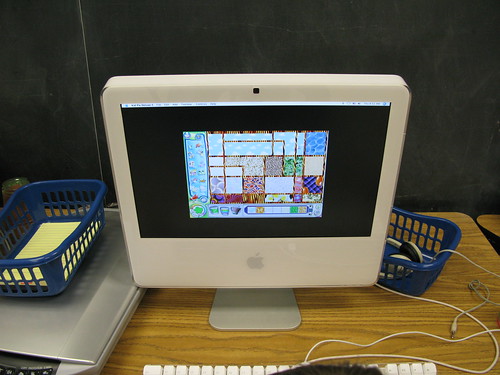 I have baskets with yellow pads and pencils next to the computers this year. I wanted the students to use the pad to list those the facts as they found them. I didn't want them to worry about switching between Word and the Internet. They could have, but I wanted their focus on the facts, not the technology.
I bookmarked a Yahoo Kids page about birds and amphibians. The students access those links from our school delicious account.
I did a quick survey of the room. Most students had not heard of or used Yahoo Kids. I believe every student had used Google. I took a few minutes to explain that Yahoo Kids was written in a way that students in the third through sixth grade could more easily understand. One student said they use Yahoo.com. I asked if they typed www.yahoo.com and they said yes. I told them to just type kids instead of www and they would be able to get to the website at home very easily.
Off to the Computer
They had very little time to work on the computer independently. They quickly got onto Firefox, accessed their class link though delicious, and started finding facts. I explained to them that they just needed to find seven facts. After they found those facts, they should put a star next to the fact that they thought was most important.
Class Two
The next part of the project was to continue today with more research. Unfortunately, the Internet was down all day. With any luck, it will be back on Tuesday.
My plan is to have the fifth grade type the information into Word and find an image to support the words. I want to start showing them how to use Pics4Learning to find images that are free to use for school work. They have an extensive set of amphibian images. Their classroom teacher had asked me to review placing and moving images in Word, so I have a dual purpose.
The fourth grade has just finished their first PowerPoint presentation. In our first lesson, we learn to use the drawing tools to draw a page of rectangles, circles, triangles, a test of all shapes, and a face they make with the shape parts. The lesson is intended to get them over potential stage fright. They enjoy learning how to create drawn objects, change their color, and play with the fill tool.
I will have the fourth grade students use PowerPoint. They will have one slide for each fact. They will choose one image for each slide. They will write their sentence in the notes section. This will become the basis for all PowerPoint presentations. I want their notes to become the bedrock of their presentation with the images as support for their words in all grades through the eighth grade.
Further Research
Once we complete these preliminary steps, I will want to have the fifth grade students do another research project. In the next project, I will expect them to build on the idea of gather seven facts to creating a more substantial and less formulaic paragraph in Word.
Thanks for the idea Brian!
Image Citation:
Levers, Andreas. "Spoons." 96dpi's photostream. 13 Feb 2009. 12 Mar 2008.
http://farm3.static.flickr.com/2001/2328898956_928652bc31.jpg?v=0
Mac with baskets - my image.
 The best part about collaboration on a wiki is that no one person has to be centrally responsible to update pages or comments. The difficulty arises when there are numerous collaborators. I've been trying to establish some best practices for myself when it comes to project management for all my students.
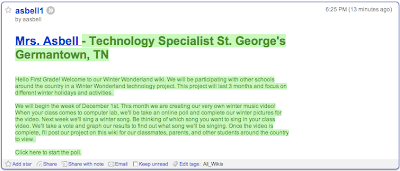
Winter Wonderland ProjectI currently have three grade levels starting a three month project. It was put together by Amber Coggin, Nedra Isenberg, and Vicky Sedwick. I am really struck by the level of organization in this project. I am very hopeful that with so many participants, my students will give and receive feedback between several different classrooms.
Each of my grade levels will be doing a slightly different project based on their current skill set. My Kindergarten, first, and third grade students are participating. From what I can see, there are about 50 teachers who have signed up to participate with various grade levels.
Keeping Track of a Moving Target
The projects are not moving targets, but the ebb and flow of each web page is. I want to be able to point my students to the existing content so that they do not become frustrated clicking on empty pages.
A while back, I remember hearing Vicki Davis talking about subscribing to the edits and discussions on all of her wikis. In 2007, my students and I started dipping our toes in the waters of wikis. I was quite able to keep up with every change since I only worked with one grade level at a time. The students didn't seem interested in using their password outside of class.
In 2008, I expanded the reach of wiki users in my building to the second through eighth grades. It was still fairly manageable. It was the first time I worked on other teacher's wikis, too. In these instances, there were few participants. The Winter Wonderland project is a horse of a different color.
How To...
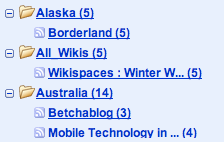 The method is so easy in Wikispaces. By selecting the Manage Wiki link at the top left side of the screen, you are presented with a variety of options. One of those is the Notifications icon under the Tools set.
There are three RSS feed options: monitor edits and discussions, just edits, or just discussions. Alternatively, you could sign up for email notifications, but I did that last year. The mailbox filled up and I felt overwhelmed.
I selected the RSS feed for monitoring edits and discussions. I copied and pasted the link into Google Reader. Now I have one stop shopping for everything that is going on in that wiki.
My Thoughts for My Students
This method will not help my youngest students. My current plan is to find schools as they begin participating and bookmark them to the school delicious account. Today I was able to bookmark a Kindergarten and third grade page. I will walk them through the entire wiki and they can explore on their own. I will want the students to look directly at these pages, so it will give me flexibility to quickly route the students to one point in the wiki.
What Else Can I Be Doing?
My question comes from my knowledge that there are far more experienced teachers using wikis out in the wider world. What are you doing with your youngest students to make working within a wiki as easy and streamlined as possible? What ways of working do you have as a teacher to balance directing your students at content efficiently?
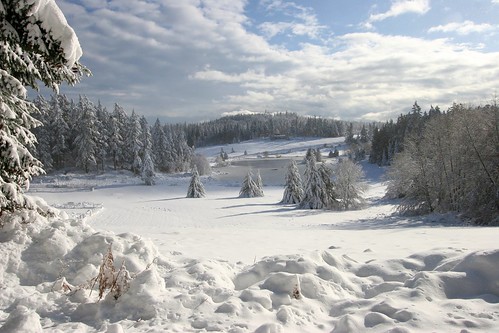
Sierra, Piero. "Winter wonderland." Piero Sierra's photostream. 2 Dec 2008. 2 Dec 2006.
http://farm1.static.flickr.com/108/311704005_8a41ff40bc.jpg?v=0
I started the K12 Online Conference off with the presentation, I Like Delicious Things: An Introduction to Tagging and Folksonomies by Chris Betcher. I will be inviting teachers in my building to my room soon to get them started with the K12 Online Conference. Since many of them are just Getting Started, I thought I'd view all the sessions in that strand as they are released so that I can recommend different presentations.
When Blogging Remember
If you are blogging about a K12 Online experience, remember to find the tag for the presentation on the far right of the K12 Online 2008 Schedule and use it as a label for your post. Chris' session is k12online08gs04. The tag will be picked up by Technorati. Others will be able to find reflections on the same session easily.
The Presentation - Tagging and Flickr
I really enjoyed the format of this video. Chris opens up the concept of tagging with a visual image of the Sydney Opera House. He uses his Flickr account to explain how tagging is useful. It seems like a great way to begin talking about the concept of tagging and why it would be helpful to someone. Even though I use tags in Flickr, my first instinct would have been to talk about tagging with bookmarking websites.
The Presentation - Tagging and Delicious
After giving an overview, Chris does expand on the uses of tagging with the website known as Delicious. He demonstrates the use of tags in bookmarking websites. I think he used very clear examples that someone who was just getting started could easily understand. He also kept the theme of the Sydney Opera House. We begin to learn about the use of tag clouds, too.
The Presentation - Wordle
As a final example, Chris demonstrates the use of Wordle's website to generate tag clouds out of any type of text. I learned that the United States Presidential speeches are available to turn into tag clouds. What a unique way for students to analyze what was important in different times. I have to follow the links in his presentation area to learn more.
New for 2008
One new feature of the K12 Online Conference is the use of Voicethread to create "Cup of Joe" reflection areas. I wasn't sure if I should listen to the conference presentation first, or preview the Voicethread's three essential questions posed by Chris Betcher before listening. I ended up listening first. I took a quick look at the three essential question on the Voicethread and will have to come back to this new feature later.
Technorati Tags:
[k12online08gs04]


