Showing posts with label winter wonderland. Show all posts

Sunday, February 1, 2009

Winter Wonderland and Third Grade Research

Back in December, Kevin Jarrett over at Welcome to NCS-Tech! wrote a post about research skills called On searching, web literacy, and the ubiquitous "animal report". I've been giving that topic thought since becoming a teacher seven years ago.

Personal Experience
My two sons are no better and no worse than the average student at our school in their research skills. We've given them a lot of attention at home to try and help them learn what they do not seem to understand from thei
r classroom lessons. In the computer class, we have completed mini projects and learned various search skills. I have come to the same conclusion as Kevin, online search skills really must be follow book based skills. I hope I paraphrased you correctly, Kevin.

Winter Wonderland January Project
I have had some trouble getting the January Winter Wonderland project off the ground in Kindergarten and first grade. I wasn't able to find a project I wanted to use
with Kindergarten and the first grade is working on Dance Mat Typing. I've really been working hard with the third grade, although it wouldn't be apparent from my student's wiki page.

The Penguin Glyph
I really liked the Penguin Glyph project. Amber Coggin put the files together. They are under the January heading on the activities page. We start using PowerPoint in the fourth grade. For the third grade, this glyph is a gr
eat introduction to the PowerPoint screen and the idea of glyphs in general. Her PDF file explains what the various colors represent (such as orange feet would mean a boy created the penguin).

I wanted to do more and I thought this would work well as a research project as a group activity over several classes. The big question was: How?

The Big Six

I did some research on teaching basic skills and came up with several Big Six resources. I found that for younger students they call it the Super Three. One of the most obvious points is to come up with a focused question to ask the students. I decided something simple would be to ask: How is a penguin different and similar to our state bird. We've been picking at the question a little every week.

First Focus: The Eastern Goldfinch
Our state bird is the Eastern Goldfinch. I found a n
ice printable sheet on the American Goldfinch on the Little Explorer's website. Before giving the student's the sheet, I asked some questions using the Promethean Activotes.


Without prior discussion: 1 child clicked A) Emperor Penguin, 6 children clicked B) Eastern Goldfinch, and 3 children clicked E) American Robin.


Two children chose B) Hair and eight children chose F) Tails.


Three children chose A) Seeds and seven children chose B) Nectar. We had an interesting discussion about what type of birds eat nectar and what type of beak shape they require.


One student chose A) in pine trees, two students chose B) in weedy grasslands, 1 child chose C) in a building, 4 students chose D) at the edge of a pond, and one student clicked E by mistake.


This question also prompted some interesting size discussions as one child chose A) four inches, one child chose B) twelve inches, 2 children chose C) four feet, and six children selected D) one-half inch.

Drawing in Kid Pix
Armed with these images and the discussion, I gave the students a printout from Enchanted Learning. It has a black and white outline of the American Goldfinch. I asked the students to do their best job to sketch the bird in Kid Pix. I projected some photographs on the screen from Flickr so the students could try to match the bird's coloring. The student's images are really turning out quite well.

Next Steps
In an upcoming post, I will talk about how we practiced reading for information while integrating the Activotes. We will also be using the Activotes to look at scanned images from a book about penguins and read to find information.

These are some good first steps to leading my students to find information in print in the third grade. Your thoughts and insights are welcome to help me extend the lesson.

Sunday, January 4, 2009

Serendipity

I was just getting ready to call it a night and started thinking about serendipity...a happy coincidence. My son would tell me, "That was random", but it really isn't.

I Began with a Plan
I knew, almost a year ahead of time, that I would be teaching in my current position. I probably killed a tree (slang for printed A LOT) with all the research I did for Kindergarten through eighth grade classes. It took me till this year - seven years later - to finally admit it needed to be recycled.

It's almost as if I needed to do all that research, look at all those static web pages, and try things out on my own before I got to where I am today. I'm pretty satisfied with the work I accomplish with my students. My original plan for the first year was to have K-3 work on similar tasks with some over lap in 3-5 and 5-8. The second year, I filled in new work for the even numbered grades and continued to bump it up year after year.

Here's Where Serendipity Works
I have a set of skills that I expect my students to achieve at each grade level, but I don't have to have the same project year after year. In previous years, I would have Kindergarten students draw any Christmas picture in December. The first graders drew an advent wreath. The third graders drew a Christmas card. This year, I had them do the same work, but the output is very different. Instead of a single printed page that came home in the backpack ... possibly crumpled up ... probably thrown in the garbage or at best recycled, we showed our work to students in other schools.

I arrived at this project as the result of a happy accident. I am a statistics junkie. I like to know how this blog posts I write are found. I've established several wikis with different educational content. I keep track of those pages, too. One day, I noticed someone came via elementarytechteachers.ning.com so I stopped by. I was delighted by what I found. The site quickly became a daily stop. When I first found the site in September, I wrote that there were over 100 educators. Today there are 255 and counting.

I didn't plan these Winter Wonderland movies for Kindergarten, first, and third. The follow up lessons to creating the movies have all been serendipitous events.

Today's Gem
I stop by Twitter often during the day for a few minutes here and there. I share a comment, offer a hand, or otherwise connect with my network. Silvia Tolisano shared the following message: Please help my elementary school "Go Around The World with 80 Schools" http://tinyurl.com/7xxx9x Please retweet. Thanks

I went to the Langwitches blog and filled in the Google Form. We'll see where it leads my students and I. My sixth graders enjoyed a Skype experience last year. It was tied into a math project. My Kindergarten students enjoyed a Skype call in December. Whatever class (or classes) participate will come away excited. It's a quick in/ quick out type project. I will post information about the outcome after we participate.

Everything Happens for a Reason
This all ties into what Lisa Parisi shared as item number one on her list following the "Seven Things" meme. Everything happens for a reason. I don't know why I chose to type the search term into Google that led me to see my first wiki. Even preceding that, it was the way our school's secretary answered the phone that led me to enroll my son at Saint Michael. His enrollment, led to my joining the Home and School Association which in turn led to my job.

So, be on the lookout. The seemingly random choice you make today may have a ring of serendipity several months or years from now. Happy New Year and be open to the possibilities.

Image Citation:
Screen capture of my Statcounter page. I highly recommend their service!

Tuesday, December 23, 2008

Collaboration Station


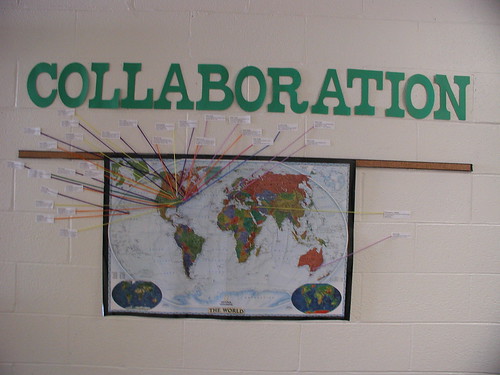
Most of my classes are connecting with at least one class somewhere in our country or around the world. I wanted a way to show all those connections in one place.

The Map Outside My Room

I've been doing a lot of cleaning and tossing of things at home. We are working on selling our house. At the beginning of September I found a National Geographic world map. I had the principal laminate it and I hung it outside the computer lab.

It was a pretty lonely map for most of September and October. I had joined a project with Lisa Parisi called Time Zone Experiences. We had a dot on Long Island, New York and another in West London, England. Next, I joined a Winter Wonderland project. My Kindergarten, first, and third graders created some movies with winter images created in Kid Pix
. We have been viewing projects from other classes and leaving comments on the discussion tab on the wiki.

New Opportunities
This past week, I needed a couple of quick projects for my fourth and seventh graders. Over on the Elementary Tech Teacher's ning, I saw a message from Vicky saying that her fourth grade students created some Christmas tongue twisters in Voicethread. This was a great opportunity to show the fourth grade what a Voicethread was and how they could contribute. It really didn't take too long to explain how to choose their identity from a list I had preset in my ed.voicethread account. I set up a ten dollar education account last ye
ar so that I might have an easier time showing the site at public schools. Now I understand that this may be the only way to sign multiple students on through the same account at the same time.

As a follow up activity, I'm going to have the fourth grade create an image for their avatar in Kid Pix.

Old Opportunities
I used Voicethead with the current seventh grade when they were in my sixth grade math class last year. They already had avatars and identities. This yea
r, I just had to remind them how to make a comment. They added to Silvia Tolisano's What Could It Mean Voicethread. It was a great activity for Christmas week. They left their ideas on what the images could mean if they lived in a different country or a different part of our country. When we return from vacation, I will assign each image to a group of students. They will have to decide which answer of all the responses could best describe the image. Finally, we'll review the actual answer.

Math Connections
Finally, our sixth grade students will be joining Linda Nitsche's students on a math
collaboration. I found it via Lucy Gray's Global Education Collaborative ning's project database. Having taught middle school math for four years, I know there is never enough time to do all you would like with getting students to talk about math. This project will give us four opportunities over the course of the year to work on a data analysis, geometry, number operation, and measurement challenges.

Monster Project
This leaves two grades waiting for collaborations. My eighth grade students do not have a project in the works as of this time. My second grade students will be participating in a monster exchange. It is on the monsterproject.wikispaces.com site that Anna Baralt and I worked on last year. I am really looking forward to the project this year as I do
more work in advance on adjectives in the second grade. If you'd like to join us this year, please let me know. We'd be happy to include your second or third grade class.


Image Citation:
Ann Oro 23 December 2008.

Tuesday, December 2, 2008

Keeping Track of Wikis

The best part about collaboration on a wiki is that no one person has to be centrally responsible to update pages or comments. The difficulty arises when there are numerous collaborators. I've been trying to establish some best practices for myself when it comes to project management for all my students.

Winter Wonderland Project

I currently have three grade levels starting a three month project. It was put together by Amber Coggin, Nedra Isenberg, and Vicky Sedwick. I am really struck by the level of organization in this project. I am very hopeful that with so many participants, my students will give and receive feedback between several different classrooms.

Each of my grade levels will be doing a slightly different project based on their current skill set. My Kindergarten, first, and third grade students are participating. From what I can see, there are about 50 teachers who have signed up to participate with various grade levels.

Keeping Track of a Moving Target
The projects are not moving targets, but the ebb and flow of each web page is. I want to be able to point my students to the existing content so that they do not become frustrated clicking on empty pages.


A while back, I remember hearing Vicki Davis talking about subscribing to the edits and
discussions on all of her wikis. In 2007, my students and I started dipping our toes in the waters of wikis. I was quite able to keep up with every change since I only worked with one grade level at a time. The students didn't seem interested in using their password outside of class.

In 2008, I expanded the reach of wiki users in my building to the second through eighth grades. It was still fairly manageable. It was the first time I worked on other teacher's wikis, too. In these instances, there were few participants. The Winter Wonderland project is a horse of a different color.

How To...
The method is so easy in Wikispaces. By selecting the Manage Wiki link at the top left side of the screen, you are presented with a variety of options. One of those is the Notifications icon under the Tools set.

There are three RSS feed options: monitor edits and discussions, just edits, or just discussions. Alternatively, you could sign up for email notifications, but I did t
hat last year. The mailbox filled up and I felt overwhelmed.

I selected the RSS feed for monitoring edits and discussions. I copied and pasted the link into Google Reader. Now I have one stop shopping for everything that is going on in that wiki.


My Thoughts for My Students
This method will not help my youngest students. My current plan is to find schools as they begin participating and bookmark them to the school delicious account. Today I was able to bookmark a Kindergarten and third grade page. I will walk them through the entire wiki and they can explore on their own. I will want the students to look directly at these pages, so it will give me flexibility to quickly route the students to one point in the wiki.

What Else Can I Be Doing?
My question comes from my knowledge that there are far more experienced teachers using wikis out in the wider world. What are you doing with your youngest students to make working within a wiki as easy and streamlined as possible? What ways of working do you have as a teacher to balance directing your students at content efficiently?


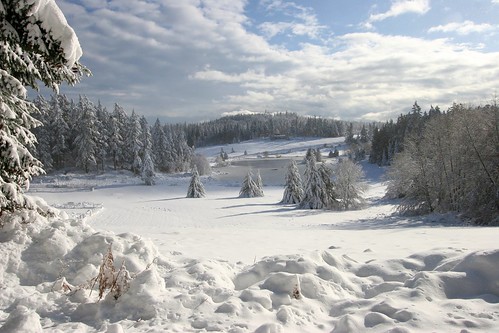
Sierra, Piero. "Winter wonderland." Piero Sierra's photostream. 2 Dec 2008. 2 Dec 2006.
http://farm1.static.flickr.com/108/311704005_8a41ff40bc.jpg?v=0