Showing posts with label wikispaces. Show all posts

Tuesday, October 27, 2009

Musical Citation Project

There was a conflict with scheduling my use of the tablets today (a problem I like to have) so I had to come up with an extra project last night. I keep a list of future projects on my delicious account and found an interesting idea.

Reviewing Citations
Last year, I worked on the idea of saying thank you for images in a PowerPoint lesson for the fifth grade. I wanted to extend that thought in a new way. I do not like to over use PowerPoint and felt that I'd like to use images again.

The lesson found on Pics4Learning's website suggests that the teacher selects a piece of music that students can use with images in Pic4Learnings free photos.

I did a quick search for Creative Commons music and came across an article titled Creative Commons Music in Honor of Obama. I listened to a piece titled Taps-America the Beautiful by Obi Best. It is a beautiful piece with an attribution-noncommercial 3.0 unported license. This is perfect for the project. I was able to edit out the taps and have a minute and eleven seconds of song.

I used EasyBib to create a citation for the music and posted the lyrics, music citation, and link to Pics4Learning on our wiki page.

Learning Ahead
I introduced the lesson today. I played the piece and asked the students to think of images that came to mind as they listened. They enjoyed the music, swaying to the beat, humming and singing along. They suggested some images as starting points for each other.

I decided the best way to proceed was to teach them how to make a Bookmarks folder in Firefox. As they found images they would want in the presentation, they added a bookmark.

We're going to import the MP3 into iMovie and add the images to complement the music. The students haven't used iMovie yet. They already have plans to bring the music into Garageband to mix it up. I didn't plan that part of the project. It evolved in class as they asked for the option. It was a great opportunity to talk about the Creative Commons license selected by the artist which allows for remixing of the song.

Overall Plan
We will create a title and a series of images for America the Beautiful. The students will include citations for the music and all the images. We will eventually upload the completed movies to our school podcast page and/or my vimeo account. I'll have to determine this as I see the project evolve.

In the end, the students will have 24 versions of the song. We will do a little analysis at the end. The project is still evolving, but it seems like the students are going to have a lot of fun while they are reminded once again about citations AND begin learning about copyright, creative commons, and the public domain.


Image Citation:
"America the Beautiful..." longhorndave's photostream. 2006 Jul 15. 2009 Oct 27.
http://www.flickr.com/photos/davidw/189892126/

Saturday, October 10, 2009

GPS Travel

I saw a message on Twitter today that reminded me of a project I've had in the back of my head since last June. A teacher said that her students' geocache had made it from Florida to Washington, DC. She couldn't wait to tell the students. Since I took a few students on a geocache expedition last June, I've had it in mind to purchase some travel bugs and send them on their way. My son is in the picture holding the first cache we located.

Developing the Idea
I was talking with my husband and sons at dinner about the DC travel bug. As we were talking, my husband suggested that I start by trying to get the bug to move from our school's town to a neighboring town's geocache. I think that's a good idea to start the project. Next, I thought it might be useful to plant a geocache at my home where I could control things (and have a shorter trip to retrieve the bug).

As we ate, I realized that another "easy" trip would be to send the bug down to Florida to a teacher I'm comfortable working with online. As I continued to eat, I thought about other teachers who are far more comfortable with geocaches. My students and I could learn so much from a collaboration.

GPS Travel Wikispaces
I'm not sure if anyone has set up a project like this, so I created gpstravel.wikispaces.com this evening as an education wiki. I'm borrowing heavily from my work on monsterproject.wikispaces.com and timetravelexperiences.wikispaces.com.

In my mind I envision setting up some research for the students. They would learn and create artifacts to show what they learn about longitude and latitude, how their GPS unit(s) work, and what, if anything, they have done with geocaching.com.

As Anna and I developed the monsterproject wiki, we started including information to help the teachers. Based on that wiki I have a getting started, lessons plans, and helpful hints set of links on the new wiki. As other teachers join in they can add to those links.

Let the Games Begin
I have created the Google Form below to allow teachers to register so I can start tracking interest in this idea. I'll look forward to sharing a Skype call to brainstorm the lessons. We can all give it a try together and see where it leads.


Tuesday, September 29, 2009

Time Zone Experiences - Year Two

Last year, I joined Lisa Parisi and Christine Southard on a wiki called Time Zone Experiences. The fifth grade students learned so much and had so much fun that I've decided to work on the project with my new fifth grade students. When I mentioned it to Lisa, she just said I should make sure to invite others and hopes we get many participants. Here is an explanation of the project.

The Project's Beginnings
Lisa was talking with Jo McLeay about needing a way to figure out what time it was in different parts of the world. As they spoke, they began to talk about the difficulties in explaining time zones to students. I joined Lisa in the summer of 2008 to set up the wiki and send out the message that we were looking to invite classes from around the world to learn about time zones and seasons.

Students Lead the Learning
This project is intended to give students time to investigate the concepts and create projects to show their learning and comprehension. I've started the project this year by having the students write a short paragraph in Word about our current season: fall.

After everyone had a chance to finish their paragraph, we discussed their concept of the seasons. We live in New Jersey. We talked about whether it was fall in Pennsylvania, California, and Florida. I asked them if they thought it was fall in England or Australia. This led to a discussion about the Earth in relation to the sun.

In our next class, we began talking about time. I had them answer a short survey about when they go to bed and wake up. There are questions about whether they have traveled to a different time zone and how their families communicate with others outside their time zone. We will use this information as the students complete the time zone chart in the coming weeks.

With this background information behind us, we took time to research GMT on the Internet. We worked on the Activboard to generate a list of search sites the students use to do research for their teachers. The students sat at their individual computer to try to learn what the letters GMT stand for. As a hint, I told them that we have been speaking about time and seasons. The letters have something to do with these topics. Last year, students were getting confused with other topics that use GMT as an abbreviation.

Each class is forty-two minutes long. This past class I had the students try to find out why Greenwich Mean Time is used, where Greenwich is located, and if they could find out what time it was in New Jersey if GMT is 11:00. We spoke about their research and then began to learn about military time on the Activboard. They began to get a feel for 0:00 being midnight and 12:00 being noon. Everyone had a chance to convert a time on the board.

Next Steps
I will be assigning a time period to each student. They will have to determine what is happening in our part of the world at GMT 0:00 through GMT 23:00. This is an example of what the students did last year. We will then roll the information into entries for the Time Zone Experiences table for 2009. Here is the time zone chart from 2008. Last year, the students created audio podcasts for various time periods and months. We will do the same again this year. The students really enjoyed using Garageband.

Reflections
Once all the student work is completed, we will add to the Voicethread reflections Lisa set up.

Independent Project
This is a project that relies on participation from other schools so that the students can appreciate other student perspectives around the globe. The nice part about the project is that we do not have to have any particular deadlines. Classrooms can participate and add to the wiki as it suits their needs. We will also be able to look at last years work.

Is It Something You'd Like to Do?
If this project interests you, please let me know via this blog, the wiki, Twitter, or any other venue in which we connect. I will add your Wikispaces id to the wiki. You do not have to update the tables on the wiki with your class information until you are ready to update the table and begin adding your student's research and creative content.

Wednesday, June 17, 2009

A Flock of Researchers

In the 2008-2009 school year, I participated in a Winter Wonderland project. Three teachers put together a really nice wiki. It ran for three months. I completed the January winter song project with my third grade and was about to continue on to the February penguin project when I became interested in working on bird research with the students.

Taking It Global
I am working on a Google document. I have started outlining what I accomplished with my third grade students. I am adding things I would like to include in the project next year. I want to add a collaborative component. I am hoping to find other teachers to join the document and consider having their students work with mine and others around the globe as a Flock of Researchers.

I'm borrowing heavily from the layout of the Monster Project, Middle School 1001 Flat Tales, and Winter Wonderland wikis. I will begin outlining some major components over the next couple of weeks. It is my intention to start the project around December and have students contribute through May. Work could be done as teachers have time available with their students.

General Outline
I am including a link to the Google doc here. If you are interested in brainstorming more about this project idea, please let me know [AnnNJTechTeacher {at} gmail {dot} com] and I will send you an invitation to edit the document and/ or the wiki I'm developing. Please tell me where you heard about the project, too.

The younger the students are when we introduce the concept of copyright and citations, the more likely it will be on their mind as they grow older and work on reports. I think the tie-in to image citations is a nice first step.


Image Citation:
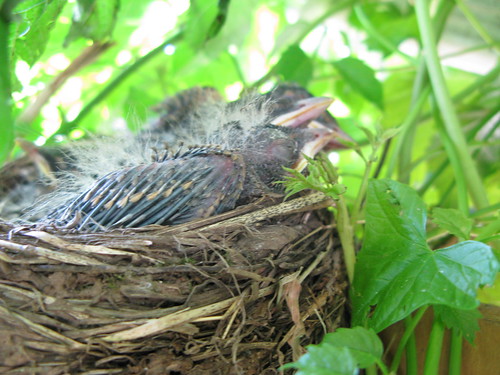
Oro, Ann. Baby Robins in Nest 5. 2009 June 17. 2009 June 3.
http://www.flickr.com/photos/njtechteacher/3593708408/

Saturday, January 17, 2009

Dioramas - Out of the Classroom onto the Net

As a parent, I’ve seen the amount of work that goes into creating a diorama. This came to to mind as I was sitting in the fifth grade classroom at lunch. I glanced at their dioramas and a project was born. I have been wanting to teach my fifth graders a little about digital photography and the dioramas would give us an object to photograph.

Digital Camera Basics

We have a variety of digital cameras. With three cameras, it is realistic to have a group of 20 students work on a project within one forty-two minute class period. Since starting the project, I purchased memory cards for two additional cameras. We now have five cameras for projects.

I started the students off with some questions to set the stage: how many students have used a digital camera, how many have their own camera, and what rules they had for using a digital camera.
They were pretty clear in knowing that they should keep fingers off the lens, stand still, and place the camera strap around their wrist or over their neck.

I had prepared three simple slides to be displayed while I gave them some additional hints for our cameras. The first slide allowed me to discuss how close one should stand to the person or object there are photographing. Most of the students realized that you could get too close.

Their teacher had the fifth grade students bring their dioramas down to the computer lab. They left them on the floor in the hall.
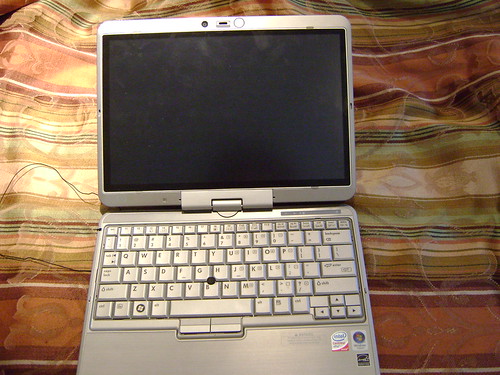
Using one of the dioramas, I gave them a visual demonstration of how close I wanted them to be to the object. This led to a discussion of the macro feature of digital cameras. I had taken a close-up photo of the button on one of our cameras for the image at the beginning of this post. It helped me to describe the macro icon on our cameras.

Students Teaching Students

When it was time to take the photographs, the students went to their own computer and began typing the description of their diorama from an index card attached to the shoebox into Word. While the students were busy typing, I took one student and demonstrated how to turn on the preview screen. It is usually turned off to conserve batteries. I modeled pressing the shutter half way to focus and then all the way to snap the shot. They were to take at least two photos and then teach the next student how to use the camera.


It really took no time at all to get the students working independently. By the end of the class, almost all the photos were taken and almost all the index card descriptions were typed. The teacher gave the students time in class to finish up outstanding work. The students back to my room later in the week to borrow the camera and bring it to their classroom to finish taking their photographs. They used their class computers to access the Word document on the file server and finish typing the index card description of the diorama.


Wikis Take the Dioramas Out of the Classroom
I wanted the students to do more than just turn the diorama into a public show and tell. I set up a template in Wikispaces with the following prompts:

1. Diorama Description

Copy and paste the description from Word into this page.

2. Materials Chosen
Why did you choose these materials for your shoebox?

3. Photography

Do you often use a digital camera?

Did you ever use the macro setting on a digital camera before?

How would you describe the macro setting to other people?
What did you choose to remove from your original photo to create the final image?

How did it make a better image?

How many photos did you take in total?

How many photos seemed a bit blurry to you?

4. Book Reports

You completed several different types of book reports this year and in previous years. What type of book report is your favorite and why?


These prompts gave me insight into the students understanding of the digital camera concepts. It gave them some time to reflect on this book report and book reports in general. Here is a completed student page.

Learning About the Discussion Tab

I used this lesson to explore the discussion tab with the students. I taught the students that the tab is for student/teacher discussions. I left each student a message after we used one class period to begin editing the wiki, copying and pasting the Word description, and importing the photo. It is so nice to be able to easily leave an individual comment for each student on their progress and get some feedback from them.


Lessons Learned

Overall, I am very happy with this project. I plan on making it an annual project for the students.


An unexpected lesson that I learned was that iPhoto takes the camera’s internal date for the photo date. When I came to this realization, it made sense. I didn’t realize one camera had its date set to 2007, so I thought I deleted the photos from the camera before placing them in iPhoto. Over Christmas break, I “found” them.

The students had taken their dioramas home. Some threw them out. Those students whose photos were “lost” either brought their diorama back to school to take more photos. The fifth grade has also made animal cell models. The students whose photos were lost or whose dioramas were destroyed used the cell model instead of the book report diorama.

It has taken a number of classes to complete the project: one to photograph and type the index card information, one to learn to crop and save the photos using Preview on the iMac, one class to learn to import the photo into Wikispaces, and start answering the questions, and one class to copy and paste the Word document into Wikispaces. The students are mostly done. I will need one more class to really have a complete project.

How About You?

Have you tried a similar project? What suggestions do you have for lessons that use projects from the classroom that use a digital camera?


Image Citations:
Macro button. Ann Oro.
Diorama. Saint Michael 5th Grade Student.

Friday, January 9, 2009

You'll Never Know If You Don't Ask


The direction of teacher training changed course this week as I managed to get our Promethean Activotes to work on Wednesday.

Ideas for the Tablet PC
The staff meeting topic was our new tablet PCs. They have been getting good use since they were brought upstairs and programmed to recognize the three Linksys routers. One of the teachers hasn't gotten around to logging the cart into the Google form yet, but we're working on her.

My original plan was to talk about Voicethread back in Decem
ber. My son got sick and I had to cancel that session. I was going to just give the class as planned from December. When I figured out how to use the Activotes, a new plan was hatched.

I turned the Activstudio flipchart with survey results into a slide show, if you want to flip through.

2009 Jan9 Teacher
View SlideShare presentation or Upload your own.


Modeling the Activotes
I decided to lead the teachers through the presentation by providing questions and reviewing the answers. The teachers seemed interested in the Activotes. They immediately began asking if the Activboard was required. I loaded the Activstudio software on all the tablet PCs and got them working while at home last week. So, I was happy to share that anyone will be able to learn to use the software to create questions and bring the Activotes in to a class with a projector.

I Learned Some Teachers Are Independent Learners

Three of the eighteen teachers have gone to look at the Discovery streaming since it was introduced to them in October. They have not chosen to use it with students yet, but I think that will change. I will be have the lab open after school to give guidance and quick answers. Three of the eighteen teachers in the room have gone to look at the website on their own. Once Catholic Schools Week is over at the end of January, I will have an open lab day to allow those who want a little support to explore the site.

I Learned Tuesday is a Good Day for Training
My first activote question asked what was the best day for training outside of school hours. One third of the teachers responded with Tuesday as a best day. Wednesday and Saturday are the least favored days to get together.

Showcasing Teacher's Work #1

I didn't want to talk through the entire 45 minutes. I did want hands on time, but we did not end up opening up the tablets. I was happy to have the Activotes to have everyone interact with the presentation at least every five minutes or so. I found out that 17 out of 18 teachers remembered the word wiki from our June training session.

I wanted to show off a teacher's wiki. She worked hard to have her second grade students write letters to service men and women. We have a teacher in the building with a son in Iraq, so it was easy to find a direct contact. As we talked about what she was doing with the students, I asked her if she would like to have the students record themselves rea
ding the letters.

I offered to scan the letters and have the students come to the computer lab one at a time to record their letters. I put all the digital media (sound and scanned images) on a CD. She estimates that it took an hour to learn how to use Wikispaces with me to create pages, links, and add the media. She finished the wiki at home.

I asked her to share the difficulties, but she said it was pretty easy once she understood the pattern. The next time, I'm going to teach her how to scan and create the CD.

Showcasing Teacher's Work #2
The next question on my flipchart was poorly designed, but it was: Have you tried the new tablet PCs with a class. The answers were: Yes, No, I'm planning on it, or I don't intend to. I should have just had three choices because seven people said "no", but I don't know if they are planning on it or don't intend to use them.

I asked the four teachers what difficulties they encountered bringing the tablets into class and what they tried with the students. Overall, they felt that it was a good experience. They discussed ways to make it work well in the classroom, and chatted a bit about the experience.

Video in the Classroom
I concluded the session by polling the teachers about their knowledge of how many digital video and still cameras we had in the school. Thanks to purchases over the years and the CDWG/ Discover Win a Wireless Lab promotion we have two Sony digital video cameras and a total of five digital still cameras.

DO IT NOW ... Click here submit your entry! The contest runs from January 2 to May 1, 2009. I only wish we could enter again. They were so easy to work with and the prize is amazing!

I wanted to showcase a few reasons why you might want to use video in the classroom. My first example was the use of the video camera to record students presenting their PowerPoint presentations. I will have the students view their video and learn what they look like and sound like when they present in front of the class. Some questions they will reflect upon are: voice level, how they face the audience, how they hold their notes as they speak, the use of filler words (um, uh, like), and other questions. I will eventually post my sixth grade son's presentation.

The second example was the use of the webcam to create newscasts of the Gettysburg Address. I can't include the set of videos created by the eighth grade, but I will eventually get permission forms for the seventh grade students.

Closing Out the Session
I closed out the session with a teaser of Voicethread. We looked at the math threads I made with my sixth grade math students last year and a class from Canada. We took a look at an example for very young students. We ended with the What Can It Mean Voicethread from Silvia Tolisano in Florida.

Overall, it was more sit and get, but the next few sessions will be all hands on.

Tuesday, December 2, 2008

Keeping Track of Wikis

The best part about collaboration on a wiki is that no one person has to be centrally responsible to update pages or comments. The difficulty arises when there are numerous collaborators. I've been trying to establish some best practices for myself when it comes to project management for all my students.

Winter Wonderland Project

I currently have three grade levels starting a three month project. It was put together by Amber Coggin, Nedra Isenberg, and Vicky Sedwick. I am really struck by the level of organization in this project. I am very hopeful that with so many participants, my students will give and receive feedback between several different classrooms.

Each of my grade levels will be doing a slightly different project based on their current skill set. My Kindergarten, first, and third grade students are participating. From what I can see, there are about 50 teachers who have signed up to participate with various grade levels.

Keeping Track of a Moving Target
The projects are not moving targets, but the ebb and flow of each web page is. I want to be able to point my students to the existing content so that they do not become frustrated clicking on empty pages.


A while back, I remember hearing Vicki Davis talking about subscribing to the edits and
discussions on all of her wikis. In 2007, my students and I started dipping our toes in the waters of wikis. I was quite able to keep up with every change since I only worked with one grade level at a time. The students didn't seem interested in using their password outside of class.

In 2008, I expanded the reach of wiki users in my building to the second through eighth grades. It was still fairly manageable. It was the first time I worked on other teacher's wikis, too. In these instances, there were few participants. The Winter Wonderland project is a horse of a different color.

How To...
The method is so easy in Wikispaces. By selecting the Manage Wiki link at the top left side of the screen, you are presented with a variety of options. One of those is the Notifications icon under the Tools set.

There are three RSS feed options: monitor edits and discussions, just edits, or just discussions. Alternatively, you could sign up for email notifications, but I did t
hat last year. The mailbox filled up and I felt overwhelmed.

I selected the RSS feed for monitoring edits and discussions. I copied and pasted the link into Google Reader. Now I have one stop shopping for everything that is going on in that wiki.


My Thoughts for My Students
This method will not help my youngest students. My current plan is to find schools as they begin participating and bookmark them to the school delicious account. Today I was able to bookmark a Kindergarten and third grade page. I will walk them through the entire wiki and they can explore on their own. I will want the students to look directly at these pages, so it will give me flexibility to quickly route the students to one point in the wiki.

What Else Can I Be Doing?
My question comes from my knowledge that there are far more experienced teachers using wikis out in the wider world. What are you doing with your youngest students to make working within a wiki as easy and streamlined as possible? What ways of working do you have as a teacher to balance directing your students at content efficiently?


Sierra, Piero. "Winter wonderland." Piero Sierra's photostream. 2 Dec 2008. 2 Dec 2006.
http://farm1.static.flickr.com/108/311704005_8a41ff40bc.jpg?v=0


Sunday, February 10, 2008

Part II - Introducing Wikis to New Teachers

After the first part of the training, I moved on to wikis. From the delicious account, we clicked on the set of links titled mrsoro and chose the Training Space for Teachers link. It was my intent to create a set of links that the students could return to over and over again both on delicious and within the wiki.

I had originally intended this to be a really collaborative workshop, but two and one half hours is just too short to introduce the many varied resources to novices and include a Think-Pair-Share and Jigsaw activity. I was also going to start with a video, but decided that I needed to get to know the audience first. I had them go directly to the link on the left side of the screen titled Standard Tools.

Last year, I learned about a process of student collaboration called Carousel Brainstorming. I wanted to use that process electronically. The way that I approached it electronically is that I split the teachers into groups of two or three people (depending on the teachers seating arrangements in the room). I assigned the groups to one of the eleven categories. The categories were: word processing, Smartboard/ overhead computer projector, Internet browser, digital camera, presentation software, drawing/ painting software, iPod/ MP3 player, cell phone, spreadsheet, publishing software and multimedia software. I told the teachers that within their group they would choose one editor and the remaining group members would help that person with brainstorming. I gave them about three minutes to come up with as many ideas as they could to use the particular tool either in the classroom with students or as a teacher.

After the time was up, I asked the teachers to click the save button. I then pointed out that they just learned how to use a wiki. There are many more things to learn, but they just performed the first basic step of editing a wiki.

I then assigned the teachers to the next category. So those who edited number one moved on to category two, and so on, until those who edited category eleven moved up to category one.

After three more minutes of work, they saved again. I explained that we could keep going with this process, but we would move on to seeing what ideas were generated. This time, the groups moved on to the next category and chose the one best idea for the topic.

By doing this project, we were able to review the different types of what I would call standard software and hardware in the classroom. We were also able to learn about the wiki.

I explained that rather than having the results on paper that would be thrown away at the end of class and lost, we had a permanent document online. Not only that, but they would be able to see what was generated by the Tuesday, Wednesday, and Thursday classes without being there.

I followed up this exercise with a “commercial break”. I had written about this back in December. We watched Wikis in Plain English from the CommonCraft Show. It ties the general idea of wikis with the work we had just accomplished.

I made sure to tell them about the 100,000 Free Wikispaces for Teachers. I told them that I have been quite amazed by the responsiveness of the team at Wikispaces. They loaded about 160 wiki ids and passwords in about a day. They have also answered emails sent to their help id in about a day. I find them a very helpful company. I also mentioned WetPaint and PBWiki. I do not have much experience with those sites yet.

From the results of their reflections at the end of class, the idea of wikis captured their imagination. It was great to find that Wikispaces was unblocked in the district. There were teachers from other districts so it will be interesting to see how it goes for them.

One of the questions I received from the last post was “how would I know if the training was put into actual use”? I tried to collect email addresses from the teachers for a follow up survey in June. The first night, I had trouble with the wiki editing, so I received no email ids from that group. I ended up with ten people to contact. It won’t be much of a representative sample, but perhaps I’ll ask the director of the program to ask them to complete the survey in one of the last classes in May to have a bigger sample.

One immediate success with the wikis was that a group of three teachers signed up for a Wikispace account before leaving the room. They have to prepare for a mock trial activity for the alternate route class. This group of three teachers is going to use the wiki to collaborate on the paper. Yes, they could use Google Documents or Zoho, but we just didn’t have time to get much of a demonstration of those products during the evening.

In the next blog entry, I will write about the next topic we covered in the evening: online professional development.

Saturday, December 29, 2007

How One Teacher Was Inspired

I'm modifying the model of those I am reading through Google Reader (although Bloglines now has my attention - thank you Clay).

This has been a year of changes in the way I conduct business in the classroom. I've always been happy with the way I approach computer curriculum. I add new things every year, starting with what the school owns and expanding.

Wikispaces - I started my first Wikispace around March. It was also the first "contact" I made with the world of online educators. I found room17math and sent a note to charbeck1.
I am a computer/middle school math teacher in New Jersey. I am feeling my way through making my first wikis with kids. I have to spend a lot more time at your site. If you have a chance, what are the top two or three things that have made this a success for you? What do you wish you knew when you started? Did you ask parents permission for the kids to get wiki accounts? I'm hoping to get started over the next month. Thanks for any insights!
His response opened up a whole new world to me. It was ALL new information. In part it read:

I was lucky enough to take a course with Vicki Davis "coolcatteacher.blogspot.com" during the k12online conference...A great place to start is at Women of Web 2.0 They have a chat every tuesday at 9:00 est on worldbriges (worldbridges.net) They are an excellent source of knowledge.
Now I had to know: who was Vicki Davis/ what is coolcatteacher.blogspot.com, what is the k12online conference and where is it held, what is Women of the Web 2.0, what does this person mean a chat every Tuesday night, and what is all 2.0 stuff?

Anyone who is capable of using Google can find the answers pretty quickly. I started reading Vicki's blog, was disappointed I missed the conference, and decided I didn't have time to get into all this right now. I was in the middle of taking a certification course every Tuesday night and while it isn't the same as taking a college course load like some people are - it was enough.

All I needed to become inspired was information. I kept poking around when I had time and really chose to wait to immerse myself until vacation rolled around in June. Even then, I decided I wouldn't start until I was back from my two week driving vacation at the end of July.

I can't believe I've only been talking with online educators since August. Even at that, I really barely started the conversation. Thanks to Lisa, Cathy, and MrsDurff's welcoming attitude I began to realize that it was up to me to become part of the conversation. Mrs Durff gave me such a friendly welcome in the chat room of Women of the Web, Lisa invited me to add her to Twitter, and Cathy is always so giving in her comments to my blog posts.

July 15th - first tweet
August 6th - second tweet
September 22nd - first tweet from someone Durff
October 16th - first tweet to a person cathyjo
Last week of October - the conversation begins in earnest

I look forward now to entering further into the conversation. Thanks to a post by Dean Shareski, I try to log all my comments into Cocomment. It's not the easiest system, but it works to show me the continued convesations where I leave comments. It's easier than remembering where I write. I also did not realize, at first, that I had to go back to posts where I left comments to see that others were responding back to what I said.

The moral of this story: You never know what you're going to write that will be the inspiration to the next teacher on their road of discovery!