Showing posts with label blog. Show all posts

Tuesday, June 10, 2008

I <3 Computers and Math

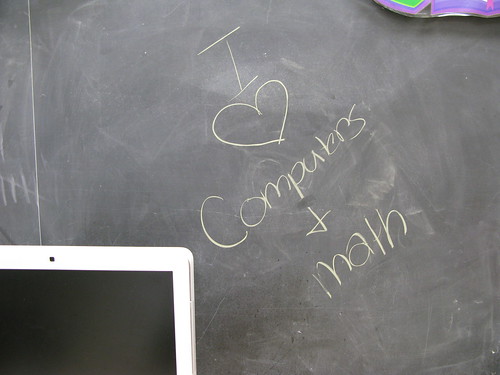
One of my favorite things to see in my room is a student pick up a piece of chalk and leave a message like the image to the right behind.

My students and I worked very hard on many projects. Some were oldies but goodies that I do from year to year. Others were new and never tried before at my school. I'm getting ready to do a meme on professional development planned for the summer. Before I do, I wanted to reflect on this past year.

Math Class
I managed to get further in the chapters than last year. That's always a good thing. I had more students grasp the concept of multiplying and dividing fractions and mixed numbers, too.

This year, I pushed to do a few new bits on the technology integration side. I used David Warlick's fine Classblogmeister product to create a place of reflection for the students. We managed to use the site to contain research for decimal division and rounding.
  • On the upside: Most of the students managed to make the posts from home or during recess in the computer lab.
  • On the downside: We became involved in creating a movie about population density and I didn't assign any more questions for homework. As a result, there haven't been any posts to the blog in 2008.
We used Voicethread to capture images of items the students weighed on a digital scale. I created questions and had the students answer them as comments.
  • On the upside: The project became a joint project with Shaun in New Brunswick, Canada. We ended up commenting on his student's Mental Math Voicethread and they commented on ours. We had a Skype call between the two classes, too. It was a first for my students and I.
  • On the downside: A couple of students didn't get to weighing and photographing items. We had school canceled today due to heat when we were supposed to have a second Skype call. We end classes on Thursday and the other school is on a field day tomorrow, so it may not work out.
We created a movie using the iSight cameras built into our iMacs. The students needed more clarification on what population density was, why some numbers were so low, and why some numbers were so high. They made music in Garageband and voted via SurveyMonkey for the intro song and the closing credits song.
  • On the upside: It became a nice computer class project. I'd estimate that it took about six 42-minute periods to create. It will be something they can look back on.
  • On the downside: I'm not sure that all the students "get" population density, yet. Not all students returned permission slips, so I had to edit in some images and text to the presentation to replace the missing students. I made sure to save the movies as .mov files and my SMS Computer Podcasts page on Podomatic insists on changing them to .mp4. Right now I'm uploading to Teachertube to see what happens. I might end up uploading to Youtube as well.
For the second year in a row, I had the students create metric music songs to demonstrate what they knew about length, mass, and capacity in metric measures.
  • On the upside: It is a great project around Christmas to keep the students focused on math. The quality was better than last year because I gave better directions. We had the blog to store all the songs.
  • On the downside: It was better than last year, but there are still some knowledge gaps in metric measurement concepts.

I created some study casts with audio and a matching video set with slides at the beginning of the year to help students review for tests and quizzes.
  • On the upside: I did it and a student or two looked at them.
  • On the downside: I was not able to get all the students to see them. One father told his daughter it was because the files were .mp4 and not .mov or .mp3. I never took the time to fully figure it out. I would try again, though.

Computer Class
There is a world of reflection that I will do later in the week about computer class. With grades Kindergarten to eight to reflect on, I'll save it for a different post. I do love computers and math, myself!

Friday, January 11, 2008

Student Reflections in the Class

As some of you know, I've been working with Scratch in computer class since just before Christmas. My students in the seventh and eighth grade have a bit of a programming background through our use of the Logo programming language. (Skip to paragraph six for reflections.)

Background
We used ACSLogo for the last two years. I still like Logo, but I would say that many of the students do not put it in their top things to do in class list. Looking at my survey from class in September:

Seventh Grade Students would use ACSLogo:
38.5% (15 students) anytime
23.1% (9 students) once per trimester
7.7% (3 students) once per year
28.2% (11 students) if I must
2.6% (1 student) didn't use it as their previous school

Eighth Grade Students would use ACSLogo:
4.8% (1 student) anytime
23.1% (6 students) once per trimester
4.8% (1 student) once per year
57.1% (12 students) if I must
4.8% (1 student) didn't use it at their previous school

I probably would have went through at least a few days of Logo if Scratch didn't show up. I wanted to learn more about how the students felt about their experience with Scratch, so it was a good opportunity to teach them about Classblogmeister.

I don't have numbers, but after reviewing all their blog entries, they seemed to like it on the whole. It's a much richer environment with the ability to use graphics with the programming. It's a little more on par with the HyperLogo I used five or six years ago.

The Project

It was A LOT of work learning Scratch and putting it to a useful purpose. Since we only meet twice a week for 42 minutes, it takes a long time to finish a project. While part of the class was finishing a previous project, I had some students follow the Scratch tutorial put together by the MIT Lifelong Kindergarten group. Their Getting Started PDF file is quite good.

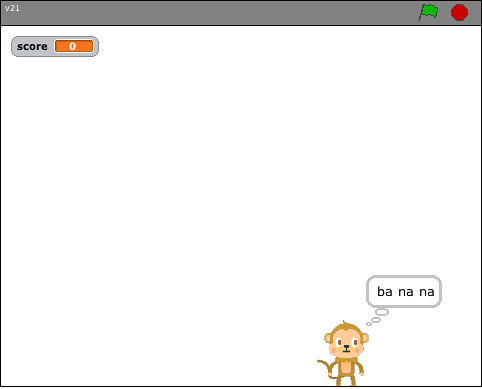
The problems arose in that the students didn't have a focus on creating a project. Over a weekend, I developed a simple Monkey Game. I uploaded four of the versions created by seventh graders: Monkey1, Monkey2, Monkey3, and Monkey4. They haven't gotten any love from the Scratch people (and I understand why). It took at least two and a half weeks (or 5 42-minute classes) to complete the project. Some students had to wait while others received help. They did a nice job of helping their neighbor as they waited for me. There was also the difficulties inherent in some students being out sick and needing to somehow catch up. I have 19 seventh graders a piece in two classes and 21 eighth graders.

The Reflections
Here's the wow factor for me. I know we talk about the importance of reflecting on your work. This was by no means a comprehensive reflection. What I found that amazes me is the number of students who enjoyed making the project step-by-step as a class. I would have thought more students were bored by the process. Also, every student who enjoyed the step-by-step process also felt successful at the completion of the project. These are things I would not normally have found out.

I want to build more reflection into my computer class. The blog is going to become a standard tool in the way I conduct my classes. For the last few years, I have had the eighth grade write a note in one of our last computer classes to tell me what they liked, didn't like, and would change about all their years in my class. It's too late then. One graduating class can give me a glimpse into my success with the students. These blog entries allow me to keep, change, or remove pieces of the program on the spot.

Next Up
I am now working with the fifth grade. They've never used ACSLogo with me. Several are on the school's FIRST Lego League team, though. I am approaching it in the same way as I did with the seventh and eighth. I am leading them thorough a project, but I'm doing a more simple starting project - a dress up project. If I start now with the fifth grade, by the time they are eighth graders, they will probably be able to do some amazing work. This is one of the true benefits of seeing students from Kindergarten to eighth grade. I can build skills. When I arrived, I had to do a lot of simple work (word processing, drawing skills, and the like). What we do now (at all grade levels) is much meatier The blog is going to become a staple. My sixth graders have used it all year in math class. I will certainly get the fifth grade going with Classblogmeister at the end of the Scratch project. It will give students the time they need to digest and reflect on what we just did. It will give me a view into what is and isn't working. It might give you, the reader, some background as you try similar projects.

If you read about something I'm doing that you are too, please drop me a comment. I love to look at other school work. It always points me in a direction that improves my student's work.

Wednesday, October 3, 2007

Spreading the New Tools Around

It's been an exhausting day. I had one class of seventh graders add to the copyright wiki today. They're getting the hang of editing. We worked on the idea of using the tabs in Firefox. We used to use Safari. The next class, they will work on plagiarism, fair use, and uploading the avatars.

Two sixth grade classes made their first comment on the rules for blogging on my page. They also wrote their first article on how they've used the tools I have available for math class. They did the actual blog work in computer class with me, though. I teach K-8 computers and two sections of sixth grade math. Almost everyone wrote that they thought Classblogmeister was easy to use, but I spent two 42-minute periods in a row jogging around the room getting everyone settled. One student took his password home and blogged from home and added a picture.

It's coming along. All I know for sure is that I must get the fifth graders blogging by the end of the school year so that when I get them in sixth grade math, they'll already know how to use the tool.

Thrown into the mix was also the completion of a Kid Pix project in grade two and Kindergarten.

I had the opportunity to share Letterpop with a teacher. She wants her students to write a newsletter when they complete their daily work. I'm hopeful it will do the job she wants. I've seen some people write about being happy with this free online tool to create newsletters.

Thursday, August 16, 2007

Notice: Window to the Edublogger World

I was looking at the e-Learning Blog by Julie Lindsay and learned about an online conference. I wish I could do it, but I'm unavailable all day. I'll be out there living life, but I'll wish I had computer access. I'll just have to catch up with the trails left online. I also found an Edubloggerworld wiki and got access to make entries on the wiki. There is also a tagging standard set up for the conference. I'll probably make an entry the night before although you're supposed to create the entry on August 23. So check out Julie's link above for more information.

I'm getting close to the start of school and can't wait to put some new things into action. I've seen how much kids who use MySpace love surveys. So...I signed up for a free account at surveymonkey. I'll start the computer class off with a survey for grades five to eight. We'll use the data for creating charts to display on the walls. It'll make a quick display in time for Back to School night. I'll probably lead the math class to creating their own survey at some point during the first three weeks of school.

I'm still working through the final details on how I'm going to present the wiki and blogging to the sixth grade math class. All I know is that I want to use it for the kids to discuss math (blog) and keep track of the contents of each class (wiki). I read somewhere on Darren Kuropatwa's blog for his studen'ts about how many exposures it takes to really learn something. I'm hoping to give the students two extra avenues to reflect, review, and learn our math concepts. I also want it to be more than an electronic version of a paper activity. I want to reach the higher levels of learning on the continuum and look forward to getting them to think on a level that is higher than recall of facts.

Finally, I keep going over and over where I want to take the wikis in computer class. Last year, I almost used them as a survey machine. It got the kids used to editing the wiki. This year, I will probably have them collaborate with a "sister" class. In at least fifth, sixth, and seventh, there are two of each class. I'll be able to have them collaborate on the same topic. In this way, I can get them to use the discussion feature. I'm still deciding on the topics, but I want to generate analysis and the creation of something new. So, I keep searching for ideas on the web and thinking.


Thursday, August 9, 2007

Gems in Blogs

I wander through blogs. Partially because I will be teaching teachers about technology over the course of the year and partially because I learn so much. I came across a great wiki in the works called The First Day Wiki by reading a blog that I can't really tell you the path that I followed. There are some very good things in the General page already.

Working on All Burners

Today I've spent more time thinking through how I'm going to use the tools that I have generated. I now have a Classblogmeister set up. It works differently from Blogger, but the advantage of having a protected area will make it worthwhile.

Last year, I assigned chapter closure problems. They propose a problem for the student to solve and it requires them to write about how they think through the problem with others and by themselves. It also asks them to solve the problem step by step and describe why they do things the way they do. It finally asks them to tell me what they learned about math, and themselves as mathematicians.

I will give them the class blog to write about the problems. I still have time to decide how they will use it and how it will work with the grade. I am also going to ask them to journal their thoughts on math.

I am now creating a wiki page that I am going to call Math Class at a Glance. It is going to be what the blog was originally intended. Each class, someone will be chosen to write about what was learned in class that day including what the bellwork was, what was taught and practiced, and the homework assignment. I will give students the ability to update the wiki entries for bonus points on tests based on the grade they received.

This is all very much under construction, but I believe it will prove useful.

Wednesday, August 8, 2007

Moving Ahead with Wikis

Joining the Classroom 2.0 ning has already paid great dividends. My first discussion post generated information that I sorely needed. Now I can plan on using Wikispaces without having to worry about having each child having an email id to create an account.

I would like to sign up with Classblogmeister, but I have a feeling that you need to have backing from a school district. Since I'm at a small private school, I'm not sure what to do. I guess I'll keep with the idea of using blogger. Maybe I'll just sign on at the start of class and have the students take turns writing at the end of class. It won't be just what I wanted, but if it was tied into a wikispace it should work just fine.

I'm working on a template to use with my teachers at school. I want to try to use a wiki for a carousel brainstorming activity. I want them to answer questions and move around the room from computer to computer instead of moving from flip chart to flip chart. It will give the teachers a few minutes to talk together about several different ways they have used computer and get to update a wiki at the same time.

I have a lot of plans for the year. It will be interesting to see where I get over time.


Yeah! I've gotten set up with classblogmeister. I've just started poking around in it, but it looks very promising. I should be all ready for September. I was beginning to worry that I would have to make it more abbreviated, but now I'm full steam ahead!