Friday, January 11, 2008

Student Reflections in the Class

As some of you know, I've been working with Scratch in computer class since just before Christmas. My students in the seventh and eighth grade have a bit of a programming background through our use of the Logo programming language. (Skip to paragraph six for reflections.)

Background
We used ACSLogo for the last two years. I still like Logo, but I would say that many of the students do not put it in their top things to do in class list. Looking at my survey from class in September:

Seventh Grade Students would use ACSLogo:
38.5% (15 students) anytime
23.1% (9 students) once per trimester
7.7% (3 students) once per year
28.2% (11 students) if I must
2.6% (1 student) didn't use it as their previous school

Eighth Grade Students would use ACSLogo:
4.8% (1 student) anytime
23.1% (6 students) once per trimester
4.8% (1 student) once per year
57.1% (12 students) if I must
4.8% (1 student) didn't use it at their previous school

I probably would have went through at least a few days of Logo if Scratch didn't show up. I wanted to learn more about how the students felt about their experience with Scratch, so it was a good opportunity to teach them about Classblogmeister.

I don't have numbers, but after reviewing all their blog entries, they seemed to like it on the whole. It's a much richer environment with the ability to use graphics with the programming. It's a little more on par with the HyperLogo I used five or six years ago.

The Project

It was A LOT of work learning Scratch and putting it to a useful purpose. Since we only meet twice a week for 42 minutes, it takes a long time to finish a project. While part of the class was finishing a previous project, I had some students follow the Scratch tutorial put together by the MIT Lifelong Kindergarten group. Their Getting Started PDF file is quite good.

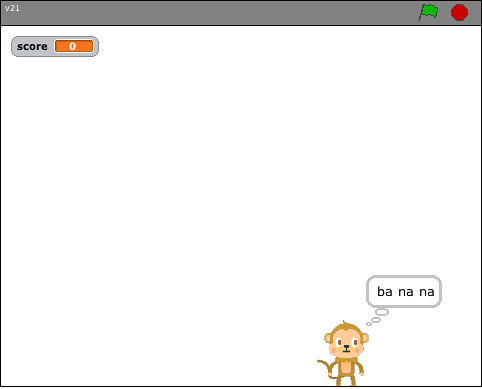
The problems arose in that the students didn't have a focus on creating a project. Over a weekend, I developed a simple Monkey Game. I uploaded four of the versions created by seventh graders: Monkey1, Monkey2, Monkey3, and Monkey4. They haven't gotten any love from the Scratch people (and I understand why). It took at least two and a half weeks (or 5 42-minute classes) to complete the project. Some students had to wait while others received help. They did a nice job of helping their neighbor as they waited for me. There was also the difficulties inherent in some students being out sick and needing to somehow catch up. I have 19 seventh graders a piece in two classes and 21 eighth graders.

The Reflections
Here's the wow factor for me. I know we talk about the importance of reflecting on your work. This was by no means a comprehensive reflection. What I found that amazes me is the number of students who enjoyed making the project step-by-step as a class. I would have thought more students were bored by the process. Also, every student who enjoyed the step-by-step process also felt successful at the completion of the project. These are things I would not normally have found out.

I want to build more reflection into my computer class. The blog is going to become a standard tool in the way I conduct my classes. For the last few years, I have had the eighth grade write a note in one of our last computer classes to tell me what they liked, didn't like, and would change about all their years in my class. It's too late then. One graduating class can give me a glimpse into my success with the students. These blog entries allow me to keep, change, or remove pieces of the program on the spot.

Next Up
I am now working with the fifth grade. They've never used ACSLogo with me. Several are on the school's FIRST Lego League team, though. I am approaching it in the same way as I did with the seventh and eighth. I am leading them thorough a project, but I'm doing a more simple starting project - a dress up project. If I start now with the fifth grade, by the time they are eighth graders, they will probably be able to do some amazing work. This is one of the true benefits of seeing students from Kindergarten to eighth grade. I can build skills. When I arrived, I had to do a lot of simple work (word processing, drawing skills, and the like). What we do now (at all grade levels) is much meatier The blog is going to become a staple. My sixth graders have used it all year in math class. I will certainly get the fifth grade going with Classblogmeister at the end of the Scratch project. It will give students the time they need to digest and reflect on what we just did. It will give me a view into what is and isn't working. It might give you, the reader, some background as you try similar projects.

If you read about something I'm doing that you are too, please drop me a comment. I love to look at other school work. It always points me in a direction that improves my student's work.

Monday, January 7, 2008

Working the Halls and Holding Hands


I was working the halls at school today and plan to continue all week. I think a fair percentage of the teachers would like to add more to their courses, but they don't know how.

As a full time computer and math teacher, I really don't have time to spend time in other classes to hold someone's hand. So, I'm trying out a new model for the rest of the year. I'm looking at projects that will integrate more global collaboration for my students. As I find projects, I'm showing them to the specific grade/ content level teachers and trying to gather interest.

Last month, the middle school Language Arts teacher agreed to help the students prepare drafts for the 1001 Flat Tales project. I looked at the sign up list and was so happy to see another participant and fellow Twitter friend derrallg on the list. For some reason, the middle school group isn't attracting the same number of participants as the elementary level.

I've been following the Teach Jeff Corwin Spanish group for a while and was really interested to see that they want participants to create video scavenger hunts. I spoke to our Spanish teacher and she's willing to brainstorm the project with her sixth graders. On Wednesday, I'm going to show her the first three videos so she sees where we would be heading with this. I'll help the students who volunteer to record the videos and get them online.

I also finally took a good look at Jen Wagner's TechnoSpudProjects web site. I had gone there before, but with an eye to doing a project myself. With this new objective of getting teachers on board, I spoke to the fourth/ fifth grade math teacher about The Great Egg Roll 2008. She's going to read all the instructions tonight, but sounds like she'll go along for the ride.

My fifth graders are already participating in the Classroombraids project through Sharon Betts and are enjoying the fruits of their labor. They'll be excited to hear the comments on their VoiceThreads this week.

I am trying to keep the number of projects to a reasonable number. I will be able to keep Classroombraids going during computer class. The Great Egg Roll is almost a one shot deal with the math teacher doing the majority of the work. The Spanish video has the highest level of work, but it feel comfortable.

Now I just have to talk with the third grade teachers about a potential Social Studies project that looks cute. A third grade class from Massachusetts is looking for little stories of how towns got their name along with photos.

Finally, Lisa Parisi is creating a VoiceThread about fictional books. I'm going to offer it as an option to my fifth graders. It won't be for the entire class, but I'll offer it as a project they can do on days when it's too cold to go out for recess.


Image Citation
Romel. "Holding Hands". WolfSoul's Photostream. 9 Aug 2007. 7 Jan 2008.
http://farm2.static.flickr.com/1116/1352149315_8ef27cb7f8.jpg?v=0


Saturday, December 29, 2007

How One Teacher Was Inspired

I'm modifying the model of those I am reading through Google Reader (although Bloglines now has my attention - thank you Clay).

This has been a year of changes in the way I conduct business in the classroom. I've always been happy with the way I approach computer curriculum. I add new things every year, starting with what the school owns and expanding.

Wikispaces - I started my first Wikispace around March. It was also the first "contact" I made with the world of online educators. I found room17math and sent a note to charbeck1.
I am a computer/middle school math teacher in New Jersey. I am feeling my way through making my first wikis with kids. I have to spend a lot more time at your site. If you have a chance, what are the top two or three things that have made this a success for you? What do you wish you knew when you started? Did you ask parents permission for the kids to get wiki accounts? I'm hoping to get started over the next month. Thanks for any insights!
His response opened up a whole new world to me. It was ALL new information. In part it read:

I was lucky enough to take a course with Vicki Davis "coolcatteacher.blogspot.com" during the k12online conference...A great place to start is at Women of Web 2.0 They have a chat every tuesday at 9:00 est on worldbriges (worldbridges.net) They are an excellent source of knowledge.
Now I had to know: who was Vicki Davis/ what is coolcatteacher.blogspot.com, what is the k12online conference and where is it held, what is Women of the Web 2.0, what does this person mean a chat every Tuesday night, and what is all 2.0 stuff?

Anyone who is capable of using Google can find the answers pretty quickly. I started reading Vicki's blog, was disappointed I missed the conference, and decided I didn't have time to get into all this right now. I was in the middle of taking a certification course every Tuesday night and while it isn't the same as taking a college course load like some people are - it was enough.

All I needed to become inspired was information. I kept poking around when I had time and really chose to wait to immerse myself until vacation rolled around in June. Even then, I decided I wouldn't start until I was back from my two week driving vacation at the end of July.

I can't believe I've only been talking with online educators since August. Even at that, I really barely started the conversation. Thanks to Lisa, Cathy, and MrsDurff's welcoming attitude I began to realize that it was up to me to become part of the conversation. Mrs Durff gave me such a friendly welcome in the chat room of Women of the Web, Lisa invited me to add her to Twitter, and Cathy is always so giving in her comments to my blog posts.

July 15th - first tweet
August 6th - second tweet
September 22nd - first tweet from someone Durff
October 16th - first tweet to a person cathyjo
Last week of October - the conversation begins in earnest

I look forward now to entering further into the conversation. Thanks to a post by Dean Shareski, I try to log all my comments into Cocomment. It's not the easiest system, but it works to show me the continued convesations where I leave comments. It's easier than remembering where I write. I also did not realize, at first, that I had to go back to posts where I left comments to see that others were responding back to what I said.

The moral of this story: You never know what you're going to write that will be the inspiration to the next teacher on their road of discovery!

Thursday, December 27, 2007

Help Wanted - Your Thoughts Please


I plan on introducing "Technology in Education" to a few different groups of teachers over the winter months. My broad outline is here on this wiki. I'm working on finishing it up over the next few days.

I want to show the teachers how they can working with students through using the tools themselves. I plan on blending some of the "standard" movies that many of us have seen online with the use of online survey tools, wikis, and blogs. I will be using the videos as "commercial breaks" as Scott Elias describes in his Slideshare presentation. I found it through Patrick Higgins' Chalkdust blog post.

I'm also trying to model some of the exercises that the group has gone through over the past few months: Think-Pair-Share, Carousel Brainstorming, Jigsaw, and Individual Reflection -- with a computerized twist.

One of the tools I plan on using to open the session is this SurveyMonkey questionnaire. I want to be able to do two things: 1) give the teachers hands on experience with the tools 2) be able to get a quick read of the group to focus our attention.

I'd be very appreciative if you would take the survey (it's a copy of the one I have for the various groups) and let me know if you think something is glaringly (or not so glaringly) missing. For example, in question 1, what category would you put Skype in? Is Yugma a different variety of Skype (similar to Twitter/ Pownce)? I've never used either.


Image Citation
Faber, Henry. "Survey says...". hfabulous' Photostream. 31 Aug 2006. 27 Dec 2007.
http://farm1.static.flickr.com/73/230444653_5dec120f88.jpg?v=0

Wednesday, December 26, 2007

Tag-a-licious

I've been using del.icio.us for a while now. I have had some successes and failures with each of the following six items. I'm was looking for a few good people to discuss common tags with an eye to promoting social bookmarking to others; specifically those in education. By the end of my work today, I've decided that maybe that's really not necessary. I found an interesting screencast by Jon Udell that gave me new insight into maneuvering through delicious.

Here are the six things I do with delicious. I can:

  1. open up any computer and have my bookmarked sites available
  2. categorize them for ease of finding later on
  3. bundle the categories in a logical manner
  4. share the sites with friends/ colleagues
  5. see what others have found by making a network of delicious users with the same interests
  6. search delicious
Open any computer and have my bookmarked sites available
This is the most direct reason for using del.icio.us. There are other bookmarking systems out there. Just type bookmarks online into Google and you'll get 11.6 million results today. Delicious rarely fails me. It's always up and running when I need it and I can tell it to store my bookmarks on my local machine when I sign out.

Categorize them for ease of finding later on

This is a touchy subject for anyone who bookmarks a web site. Touchy because, by its nature, if you are storing a lot of information ease depends on how good your filing system is. I have a category for Flickr and all its related components. Anytime I want something in Flickr or a site related to it, I can always find what I'm looking for. Since I've starting using delicious, I haven't always been consistent with my categories so I don't always quickly find what I'm looking for. For example, I was looking for this Google video about what information Google stores on its users in the middle of class and I didn't find it. I had it filed in computer_videos, but should have cross filed it in under Google.

Bundle categories in a logical manner
This does work beautifully when I take the time to bundle new categories. My husband is as technologically literate as I am (even more so when it comes to hardware). He took to the idea of delicious and set up an account for his consultants in India. He didn't get the idea of bundles and tags. It took some explaining and I'm looking for a good analogy. I said bundles are like chapters in a book or big folders inside a filing cabinet. I probably should have liken them to folders in a hard drive. I have 128 tags that are unbundled. These are the things I'd like to bundle before vacation is over.

Share sites with friends and colleagues

This works well between my husband and I. It works well between my personal delicious account and the one I set up for the school. All I have to do is type for:saintmichael and when I sign on with the school account, all I have to do is go to the links for you tab and save the bookmark to the appropriate tag.

See what others have found by making a network of delicious users with the same interests
This is another seriously worthwhile addition to my ability to learn new things. I don't always look at the your network tab, but when I do I often find one or two really worthwhile links that I want to refer back to or add to my tagged items. It's really helpful when I look at the links and see what other people choose to add as notes to the bookmarks they save. This is something I want to promote when I talk to other teachers.

Search delicious
Rather than going to Google as a first place to look, I'm trying to train myself to search delicious first. I can search your bookmarks, del.icio.us, or the web. My thought is that other people sought out information and found these sites useful. Why not cut to the chase and look here first?

If you're looking for a "how to" article on delicious, check out EdCompBlog: Show me, don't tell me. It was written way back in July 2005.