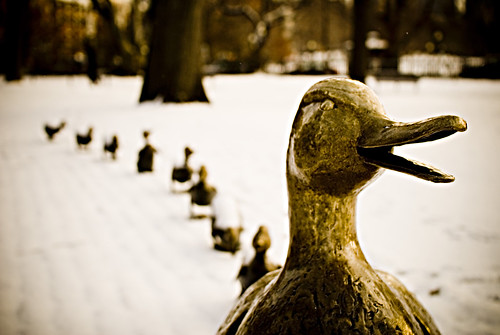
 After a bit of research over the weekend, I came up with a Google Earth project revolving around Make Way for Ducklings by Robert McClusky.
I saw one group of first graders yesterday and another today. Today went better. Yesterday, I printed out the text of the story (one set of facing pages for each child). In the original execution, I had a) one child to hold the book and show the pictures b) a printout of the story to follow along annotated with the stops on Google Earth c) the remaining children each reading a section of the story.
The problems with this method were a) the children read very softly and it was hard for everyone to hear b) more words were difficult for the children than I anticipated c) the book was a bit big for the chosen child to hold easily.
Yesterday's group did enjoy the Google Earth images, but it wasn't a great class.
Today, my second set of first graders arrived. I pretty much did it all. I started up Google Earth at our school address. I asked if they knew what they were looking at and how many children had seen Google Earth before. A handful had seen it before.
I read the first pages of the book and we talked about how far Boston was from our school. A couple of children had been to Boston. We "flew" there and looked at the pond in the park.
It was much better. All the children could hear the story and see the pictures. I held the printout behind the book so I could see the words. We looked to see if Beacon Hill, the State House, or Louisberg Square would be good places to raise ducklings.
We flew to the Charles River and looked at the island that Mr. and Mrs. Mallard chose to raise their ducklings.
When it was time to walk to the Public Gardens, we looked at the street and were amazed that the ducklings could walk so far.
It was a much better experience. I'm curious to see if anyone who reads this entry has tried something like this. What worked for you?
Image Citation:
Cullivan, Lee. "make way for ducklings." shoothead's photostream. 2007 Jan 24. 2008 Mar. 4.
http://farm1.static.flickr.com/150/367930471_2484c60420.jpg?v=0
 I really love KidPix. When I first arrived at the school we had KidPix 3 Deluxe. I loved its simplicity. I scoured the Internet for ideas and purchased many books, but eventually designed most of what I did myself. Over time, I’ve put together a lot of different projects.
This year, I created a wiki and as the weeks go by I go back through the lesson plans and add JPGs of the KidPix pages and little write ups of the projects. I use KidPix with grades Kindergarten to eighth, although the projects are really mostly for the primary grades.
I’ve mentioned the site a few times over at Classroom20.com, but thought I’d blog about it today. I still have one trimester of work to go, but it might be a useful resource to someone if they need a quick project idea.
I use the program extensively in Kindergarten and a fair amount in first and second grade. It has always been my plan to show the students that there are often more ways than one to use a piece of software. They become quite accomplished over time.
I am now using KidPix 4 for Schools. I had to switch because the old version would not work under OS X on Intel Macs. I do not like it as much. Too many bells and whistles in my opinion, but it still does a fantastic job.
I do not use Tux Paint at this point. I tried it last year and had trouble printing. I’ll have to try it again this year to see what I was doing wrong. I’m really into free open source programs whenever possible at this point in my teaching.
If you find it useful, I’m glad to have given you an idea or two. I’ll keep building the wiki. I’m also including a link on the navigation bar on the left. Feel free to add projects that you do with KidPix. I’m always on the look out for new ideas.
 Next week we start Terra Nova testing. It's a week that throws everything up in the air. I never know who I'm going to teach, how long, or how many students will be in the class at the same time.
I heard a bit today that makes it sound like I'll have each class once and the classes that are usually split (K-2) will be in the room all at once. So, I needed a plan to keep everyone happily occupied while sharing computers.
I have had Google Earth open a few times in the past month. The students in second and seventh grade liked it. The second grade used it to find out where their email pals went to school. We just looked at the neighborhood and tried to see what we could see. We found a lot of empty space (it looked like large stretches of dirt) at one school. When they wrote we learned that they are in the middle of the biggest cotton patch in the world.
The seventh grade had a temporary classmate for one week. He was visiting his cousins over summer break from Argentina. His family thought going to our school for a week would be a great way to practice his English. He had a good command of the language as far as I could tell. Rather than having the standard class lesson that I had prepared for the day, I started up Google Earth. The student showed us around his town and then my students showed where the lived.
I have read that there are many uses for Google Earth in the class, so I decided to plunge into it next week since it's going to be an odd week anyway.
I put out a tweet: I have to explore Google Earth this week. Going to have room full of first graders next week and it might fit the bill during testing week. A short bit later, I received a link from @Digimom to her blog with resources for Google Earth from a TCEA workshop.
I was going to poke around delicious links, but this set was just what I needed. After poking around a short bit, I found what looks like the tip of a nice project iceberg.
There was a set of Google Earth Lesson Links and I chose Google Lit Trips. My plan was to find something for early elementary set - preferably first/ second/ third grade maybe. A cute story that I enjoyed reading to my boys was Make Way for Ducklings by Robert McClusky. There was a pre-made trip around Boston to all the stops the ducks made in the story. Perfection.
We can have a read aloud with the story and follow the trail in Google Earth. If I have time, we'll draw something in Kid Pix, or it can be carried into the class the following week.
These types of serendipitous events happen so often with my fine network. Thanks for helping me out Anna. Hopefully this blog post will be found by someone with a similar need. If you try something based on this post, let me know how you extended the lesson. I'm thinking along the lines of creating a story where the ducks come to our town. We have the Rahway River near the school and it would make an interesting digital story.
 When I grow up, I want to have made a difference. I guess that’s how I’ve come to teaching. I’m sort of grown up now but have a quarter century, at least, until retirement.
I love what I’m doing and where I’m doing it. I don’t want or need a change. At the same time: I want to work under a great mentor and have so much more happen for my students, I want to stay the computer teacher, I want to become a classroom teacher, I want to teach teachers, I want to do what David Jakes does.
What I need to do is compress about thirty lifetimes into one.
I want to be a part of every conversation, I want to travel to conferences, I want snow days everyday to keep up-to-date with Google Reader, I want to attend online conferences.
What I need to do is raise two healthy, wonderful, caring, thinking boys and spend time with my husband who is tops in my book.
When I grow up, I will look back and smile because every step I take in life leads to a new and special thing. I just wonder where 2008 will take me in the long run…it will be unbelievable!
Image Citation:
MacDonald, Grant. "quiet i'm thinking." jgrantmac's photostream. 2006 Nov 8. 2008 Feb 22.
http://farm1.static.flickr.com/120/292262245_7c480610e1.jpg?v=0
I intended to complete a write up of my time with teachers in the local alternate route program immediately following those training days. Life got in the way.
I always felt very confident in my preparation for the class starting with the survey, moving into wikis, and continuing onto online professional development. In my original plan, I was going to do a jigsaw activity to introduce blogs (both by teachers and in classrooms), online videos via YouTube and TeacherTube, Voicethreads, Podcasts, Google tools (such as Google Docs, Google Reader, Google Earth), and so on.
Overall, as time passed, I realized I faced two obstacles: time and understanding. All three nights went differently in the order in which the information was presented. I tried to keep my handout in mind at this point in the night.
I wanted to do a little show and tell with technology tools. I tied into the idea of using a cell phone from both the wiki work we did earlier in the night, the video, and the reference to the Cellphones presentation from the K12 online conference. The way I did this was pointing out the tool called Gabcast. I gave some ideas from recording students reading in earlier grades or interviewing them about their day to taking the cell phone along on a class trip for reflections. These ideas have been garnered through reading blogs. I gave it a test a week before the class and had a sample sound file on the wiki at the bottom of the page.
I recently purchased an iTalk device for my iPod and recorded my Kindergarten students singing our song at the beginning of class. At this point in class, I played the mp3 file and spoke about the iRiver and other mp3 recorders.
Another tool I mentioned was the FlipVideo camera. I do not have one, but it is a tool that I want to explore with our technology dollars next year.
During that week, we also happened to have a student visiting from Argentina. The student was in my class for one 42 minute period. I took the opportunity to deviate from our class plan to use Google Earth for the first time. I was great because I was able to show the teachers the pin he added to the map to show where he lives. My seventh graders were so excited, everyone wanted to come up and show where they lived. I was also able to talk about how I recently used Google Earth to show my first graders where their email buddies went to school.
Google Earth leads into Google in general. I wanted to give the teachers a short, quick, useful tip or two. In January, I listened to a podcast recorded by Bob Sprankle at the Christa McAullife conference. In the presentation, If You Knew Google, Susan Adams mentioned the use of the Advanced Search to find PDF files and flash animations. I just followed her lead and used water cycle as the example. We compared typing water cycle vs. “water cycle” and discussed the results. I never really used the PDF and flash advanced search feature until I heard the podcast, so it tied Google and listening to podcasts together nicely.
Next, I wanted the teachers to have some hands on time again, so I brought up TeacherTube. I explained that they might have more success accessing TeacherTube in class than YouTube. To add a little levity to the class, I started with a video that I found funny: Walkthroughs and Learning Objectives. They laughed, so it was fine. I showed how to type physics in the search box, then gave them five minutes to explore. During the five minutes, I saw at least one teacher watching Did You Know/Shift Happens. I also mentioned that they could find the Pay Attention video at TeacherTube.
I love Voicethreads as a tool. It was blocked on the laptops at the school I was visiting, but I was able to access them from my personal laptop. I showed the entire Voicethread my fifth graders created for our introduction to our partner schools. It was great because Sharon Betts added a couple of comments. I also showed two slides from my seventh grader’s Fair Use Voicethread. It shows that you can use photos or drawings and gave an example in the older grades. I gave them a little look at Wes Fryer’s Shanghai Cricket Market Voicethread to show them how I was drawn into the tool. We looked at about three images. Finally, I showed the images of objects on a scale that my sixth grade students took for math class. First the sixth grade took the photos, then I uploaded them to Voicethread and added comparison questions, finally the sixth grade added their answers. I had placed the Voicethread on the math class blog. It gave a demonstration of typing and drawing comments.
I took a few minutes to start up iTunes and point out iTunes U. I explained how I am able to find a lot of free information. For example, when I was getting ready to work with the seventh and eighth grade on copyright, I watched a talk at a major university. I gave them a list of some podcasts to start with on the wiki.
All these things happened differently each night, but we touched on them all. To finish off the night, I had them complete an exercise called 3-2-1. I set up each participant a workspace to reflect on the night. The first night, the wiki would not let them in. I think it was because I was planning on having them use a template and it just didn’t work. The second and third night, I got some nice feedback.
I was invited back to do it again next year and I’m sure I’ll tweak it again and again. On the last night, I had one participant who noticed the word Twitter on the K12 Online Conference. I gave a quick demonstration to him. I’d like to give a great big thanks to all the folks who jumped in to say hi. He was wow’d with the quick response. I think he’s comfortable with online connections already, but it might have been too much for everyone else. I think he was also surprised at the diversity of the locations responding. Thanks: @paulhami, @mrichme, @techicebreaker, @alicebarr, @JackieB, @kjarrett, @jepcke, @jeffwhipple, @kdumont, @langwitches, @ddraper, @cathyjo, @mrmosesdotorg, @mjmontagne, @mkforbus, @LParisi, and @derrallg. It gave a nice response to one interested teacher and the principal who hired me looking over our shoulders. The principals comment: “Wow, it looks like you could be online 24 hours a day”.
We could, couldn’t we?


