 Freecycle can help you help others. Teachers have been some of my best "customers" over the years. As I get ready to put some items up on Freecycle, I thought I'd outline the process for those of you who may not know about this website.
Reduce, Reuse, Recycle
This is a theme many in the United States hear over and over again. The US Environmental Protection Agency has a website that outlines some thoughts on the reduce, reuse, recycle theme. It's not just the US, either. I read an article stating the Italian government declared an emergency due to the poor upkeep of Pompeii. People are leaving mattresses and refrigerator's behind.
Is It Another eBay?
Freecycle is not like eBay. There is not one main site; although, you can click on freecycle.org to find your local group. No money changes hands. As their tag line states, you are helping to "change the world one gift at a time".
My Group
My local group operates through a Yahoo group. Once I joined, I was able to place items that are free for the taking. I've passed on used, but still good, children's clothes. I've given away old pieces of technology that are obsolete to me, but useful to others. Mostly, I give away items. A few times I've picked up books and once a bowling pin that caught my husband's eye.
Then What?
Once I place the notice of an item, I wait to see who is interested. For some items, I'll get multiple responses. My group suggests that you do not necessarily give it to the first responder, but wait a bit and see who seems to have the bigger need. Once I choose the recipient, I'll contact them via email and set up a pick up date/ time.
Does It Always Work Out Well?
I've never had a bad experience. I sometimes get frustrated. I will tell a person that the item is out on the front rail and they will not come on the appointed day. Mostly, I never end up even meeting the person. I place the item in a bag on the front railing and it is gone before I know it. In the long run, I enjoy Freecycle because most of what I need to get rid of has past its use for me but is not broken, damaged, or worthless. I'm helping the landfill stay a bit emptier. I'm giving someone something they need. I'm feeling freer because I'm not bogged down with clutter.
Give it a try and you might develop a new habit to help the planet.
Image Citation:
"Christmas gifts on Flickr." Brungrrl's photostream. 2007 Dec 3. 2008 Jul 5.
http://farm3.static.flickr.com/2109/2084326518_e4828bb388.jpg?v=0
 I just spent a few minutes, or fifteen, trying to figure out how to get a better look at link backs to my blog into my reader. A link back lets a blogger know when someone else has found their blog content useful enough to include a "link back to" their own post.
For Example
I wrote a post about the 31 Day Comment Challenge ending on May 31. Vicki Davis kindly included a link back to that post. I knew about it for two reasons: first, she mentioned in her comment on that post that she was planning on including a link to the post; second, it got picked up via Technorati. You might want to read Sue Waters' blog post "Why Does Technorati Mock Me" for some insight into that website. There is another example of a link back. I'm sending you over to Sue's blog rather than reinventing the wheel.
Why I Started Down This Path
My original intention was to go to my reader and see what was being blogged in respect to NECC onsite reflections. When I opened my reader, I noticed that I had some comments to my blog. A while back, Cathy Nelson was bemoaning the fact that she couldn't subscribe to comments from the School Library Journal and many bloggers in her reader. I ended up following a comment from Vicki Davis to her blog to copy and paste the code to display my comments in an RSS feed. That was trick in itself.
How To: Comment RSS in Blogger
I ended up going to my Layout tab. I added a Page Element and titled it Subscribe. Gave it a name: My Feed for Comments and pasted in this code: http://njtechteacher.blogspot.com/feeds/comments/default/ that I copied from Vicki's comment subscription button. Of course, I needed to change coolcatteacher to njtechteacher.
How About Link Backs?
Between writing this post and the initial fifteen minutes of searching, it comes down to this: Blogger has a bullet item at the bottom of the help on link backs that gives the following instructions:
- Go to the Google Blog Search website
- Type link:your-blog-here.blogspot.com in the search box replacing your-blog-here with your blog id (such as njtechteacher)
- You can then copy and paste the url directly intro your reader.
Now back to my regularly scheduled initial plan ... reading NECC reflections.
Image Citation:
Desirae. "Liquid Links." ~Dezz~'s photostream. 2008 Jun 7. 2008 Jul 1.
http://farm4.static.flickr.com/3016/2560241604_d4f1ce17e5.jpg?v=0
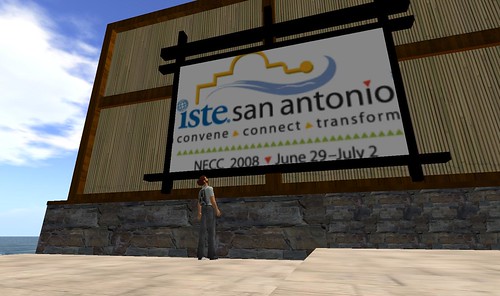 The NECC conversations are going on in San Antonio, Texas this week. I was unable to make the trip, but through the magic of the Internet I've been able to attend in a virtual sense.
How Do I Find Out What's Going On?
There are a number of different websites online that were set up in advance to help both those people on-site and those online to keep up with the information flow. The first site that has helped me is the NECClive wiki's Live Information page. There are a number of people who are using Ustream to show video streams of presentation that they are attending. They must have permission in advance.
The Full Sessions I've Attended
I have been able to listen in on and chat at Konrad Glogowski's session on Blogging. He spoke very clearly on the lessons he has learned in blogging with his students. I stumbled upon Derrall Garrison streaming a speed demo this afternoon. I was at the entire session at EduBloggerCon held by several folks called the Web 2.0 Smackdown. If you follow the link you can view the pre-recorded Ustream.
The Ustream Collection
I now have several Ustreams that I can wander through to see if anything is streaming. They include:
Will Richardson's http://www.ustream.tv/channel/weblogg-ed-tv
Derrall Garrison's http://www.ustream.tv/channel/team-force-teacher-feed
Jeff Utecht's http://www.ustream.tv/channel/u-tech-tv
There are now several more listed on the NECClive wiki. I'd also be remiss if I didn't mention EdStreamTV. This is where I initially found some video from EduBloggerCon.
The Live Blogs
I had the opportunity to live blog when I attended the conference in Princeton a while back. This past weekend, I spent some time with Alice Barr's Live Blog at the Web 2.0 Smackdown. Today I read Kristen Hokanson's Live Blog after the fact from a presentation she attended given by David Jakes and Dean Shareski about making PowerPoint more visual with students. It was titled The Power of PowerPoint. Her writing was a quick read with many useful tips.
The NECC Ning, Chatterous, Mogulus
I have not gone to the Ning, too much, but it is out there with photos, forums, and a whole lot more. There was a humongous chat going on in a Chatterous room Saturday courtesy of Bud the Teacher. He was also streaming at http://www.mogulus.com/budtheteacher. That's been pretty quiet today, too.
Do I Feel Like I'm Participating
I do. At both the Web 2.0 Smackdown and the speed demo, I was tagging the sites being described in delicious. If you'd like to see all the sites from the Smackdown - go to http://del.icio.us/njtechteacher/web2_smackdown. I only stumbled upon the speed demo, but for those links, go to http://del.icio.us/njtechteacher/speed_demo.
Do I Feel Like I'm Missing Out
Nothing will replace the camaraderie of meeting people in person, but I'm not missing out. I've spent a lot of time with my two sons playing Life and Monopoly. I've had a nice walk with my husband. I've taken care of some clean-up in my classroom. I'm enjoying the summer pace of life. Next year, NECC is in Washington, DC. I'll be there and I'm looking forward to it! So for now whether I Twitter, Plurk, use Ustream, Chatterous, or Mogolus I'm participating and enjoying the conference in my own way. This post is a useful way to keep track of all that I've found so far.
Glogowski, Konrad. "the teachandlearn retreat is ready for NECC!" teachandlearn's photostream. 23 June 2008. 30 June 2008.
http://farm4.static.flickr.com/3222/2606229622_bd2585653d.jpg?v=0
The countdown has begun to the K12 Online Conference 2008. If you have never seen the offerings, jump on over to the K12 Online Conference 2007 schedule or the 2006 schedule.
It is a set of audio and/or video presentations on various topics relevant to Kindergarten through grade twelve educators created by educators. It is free. The materials continue to be archived and hosted so you can take advantage of the programs now.
Been There ... Done That
It might be time to consider writing a proposal for a prevention of your own. Think back over the course of the year. What do you have to share with the world? The theme is Amplifying Possibilities with four strands: Getting Started, Kicking It Up a Notch, Prove It, and Leading the Change.
The Deadline
The deadline has been extended to July 11, 2008 at midnight GMT. If you were thinking about submitting a proposal, but you thought the deadline had passed, you have another opportunity.
 This week, I received an HP Tablet PC. I was just thinking about the difference between how I learned to use a Mac six years ago and what I've been doing this week.
Some Things Never Change
I have to put my hands on the tools. I'm trying to think about why I am good at what I do. At the same time, I wonder why some people find it more difficult. Part of the equation is that I like to play. When I learned that I was going to be teaching using Macs, my first question was: when can I bring one home to play? I am excited about using the tablet. When it arrived on Wednesday, the first thing I wanted to do was open it and find out how it works.
My Use of the Web Has Changed
Six years ago, I knew enough that there had to be training, tutorials, and articles online about using Macs to teach K-8 students. I don't know why - maybe the lack of a laptop and wireless Internet - but I printed reams of paper. I felt really guilty about throwing the paper out, too. I had a binder for each group of students I'd be teaching.
Now I have my social bookingmarking sites: delicious and Diigo. Now I don't have to worry about forgetting a useful site and I have a backup of my links at two different locations. I use Diigo to be a part of groups of educators. I use delicious for its simplicity. I believe I am learning along the way that a delicious account makes very little sense unless it is your own. I have now taught four different groups of adults about integrating technology in education. I'm not too sure about how intuitive either system is unless you create, tag, and maintain your own site. Does anyone have any feelings about this either way?
My Connections With Others Has Changed
The best I could do with the Mac was speak with the previous two teachers at the school. The other day, I asked my Twitter network for suggestions on open source software to put on the tablets and received a great set of ideas. Some I use all the time on the Mac and they would have been natural additions. Some were Windows applications. Even though we have two Windows desktops at home, I use games and Quicken on them for the most part. I am also being exposed to other people's bookmarks and have been saving blogs, podcasts, and other items related to tablets. I am receiving so many ideas.
Leading the Charge
I'm looking forward to my reflections here in a year. It's going to be an undeniable opportunity having a wireless lab full of 20 tablet PCs in the building. I am fully focused on gathering momentum in the school for the technology to spread out of the computer lab and past simple Internet research, Word documents and printouts.
Image Citation:
A photo of my lab back in November from my Flickr account.
http://farm3.static.flickr.com/2192/1989094839_c75c192a5d.jpg?v=0


