 Last year, the sixth through eighth grade worked on the ideas behind copyright, fair use, and plagiarism. It's a topic that needs to come up every year, at every grade level. I'm going to be using the work the students created last year as a springboard for the idea of Creative Commons.
First Steps
We will start with a survey. I'm very interested in seeing how the students respond to five short questions
1. You are making a video for your classmates at the end of the year with photos of everyone from the last nine years of school. You own Martina McBride's song "Blessed". You include the whole track with a large selection of photos. Is this fair use? Yes/ No
2. You work to put together parts of news clips from ABC, CBS, and NBC on a computer video. You like it so much, you want to put it on a CD the school sells to promote the projects students create. Is this fair use? Yes/ No
3. You interview people in Cranford about their roles in 9/11. It is loaded on the Saint Michael School web site to demonstrate your work. Another school in the US downloads the video clips for a 9/11 night. Is this fair use? Yes/ No
4. You write the DAR essay and find a web site that really provides great information on spies in the American Revolution. You cut and paste sections into the report. You don't include it in your bibliography. What is this called? Copyright/ Fair Use/ Plagiarism
5. You created a project about topics you are learning in science class. It is so good, your teacher wants to post it on the school wiki. You found photos on the NASA and Discovery Channel's web sites. Which photos have to be removed from the project? NASA/ Discovery Channel/ All/ None
Other Resources
I found a link to a resource via Clarence Fisher's blog post for a Copyright Comic. The students will read through the comic when they have finished taking the survey. This will lead them back to work they completed in Voicethreads from last year. I added a few questions for reflection. Finally, we will gather at the Promethean board to brainstorm words that should go around a bulletin board display on the side of the room. I want to add some words that describe the basic concept of copyright to the right of the current display.
Why Creative Commons?
When we create movies, podcasts, and other work in the computer lab I must be able to point the students to resources that can be used to enhance their work. I have found invaluable resources at podsafeaudio to create movies out of family vacation photos, a presentation that I am working on for the K12 Online Conference, and images for my blog. I want the students to recognize that they can have very professional looking and sounding work without breaking copyright law.
Making It Personal
We will be looking at videos from the Creative Commons organization to learn about the choices they have for their own work. Once we gain a bit of understanding, I will be having the students create little animated aquariums. They will be able to post their animation with the license of their choice. Hopefully, the will continue to build on their working knowledge of these important topics as a result of this work.
Image Citation:
Photo of my classroom bulletin board by me.
 I would have given anything to find a web site like this when I was searching the Internet back in the spring of 2000. I found many resources, but they were scattered all over the web. This past summer, I found the Elementary Tech Teachers Ning. It is a social network aimed at being a "place for elementary tech teachers to share".
It was started by Nedra in April of 2008. She shares here how she came to start this social networking site and what she envisioned it containing.
What a Success!
There are already over 100 educators who have joined the site. As with any other social network, I have seen some familiar faces and many new ones.
Forums
There is a healthy, growing forum with topics like: Computer Lab Rules and Procedures, Computer Lab Themes, Keyboarding, Open Source Software, Kindergarten, and Lesson Plans for Computer Lab. This is just a sample of some heavily visited topics. There are many, many more. If what you see doesn't fit your needs, you are welcome to start any topic of your choice.
Photos
There is a fantastic photo gallery. I struggle with room decorations. I have done well over the years, but searching online for bulletin board ideas does not usually lead me to ideas for a computer lab. As of this morning, there are 135 images from computer labs around the United States - perhaps the world. I plan on using a few of these ideas in my lab this year.
Just For Tech Teachers?
It is a gathering place for all. If you are a classroom teacher, library/ media specialist, preschool, or high school teacher, I would still encourage you to stop by and take a look. There are ideas for everyone.
Thanks, Nedra!
Image Citation:
Graham, Amanda. "Gathering of Northern Nations tent 2920." Yukon White Light's photostream. 2007 March 4. 2008 August 25.
http://farm1.static.flickr.com/174/409814504_974558a663.jpg?v=0
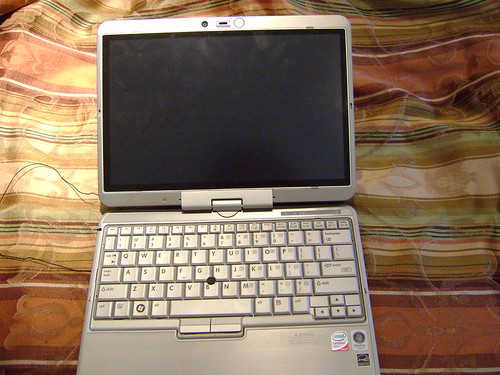 Receiving the 20 HP Tablet PCs (model 2710p) will be amazing for our school. I'm not sure what I would have done seven years ago when I first started teaching. We keep our hardware and software up-to-date through state funds. Purchasing 20 copies of Microsoft Office and KidPix would have eaten up a lot of the funds.
Free Open Source to the Rescue
As a record for the future, I am listing the software that I have downloaded for the first foray into Windows at the school. I am sure some software will be a hit and some will be removed or replaced.
OpenOffice: This will be our suite of tools for word processing (Writer), spreadsheet (Calc), and presentations (Impress). It will also provide me with database software (Base). I have not taught databases at all to any grade and it will give me a reason to do so. It also comes with drawing software (Draw) and a math equation editor (Math). I am hopeful that it will work so well that I never need to purchase MS Office again.
TuxPaint: I really love KidPix and I may have enough copies in house to install it on the tablets, but I'm going to start with TuxPaint. It is similar in many ways. It will be interesting to see how the students react to this piece of software.
Gimp: Gimp is my tool of choice on the iMac for several years. It is a complex program that allows my students to have access to Photoshop-type tools. We have used it to create GIF animations, too.
Google Earth: This program is quickly becoming a "must have" for so many different projects.I only scratched the surface introducing the program last year. I had a Make Way for Ducklings lesson for the younger students. My older students identified the locations of the schools that we collaborated with. I have not even begun to calculate distances with the students or create KMZ files. Any discipline could include Google Earth for student learning.
Google Sketchup: I added this program for the future. I've heard several teachers talking in various forums about using this 3-D modeling software. Students as young as the fourth grade have had success. I'll certainly try to give the students experience with the software this year.
Firefox: This is my browser of choice. I used to use Internet Explorer on the Mac. Microsoft stopped developing new versions for OS X, so I moved on to Firefox and never looked back. I liked it better than the old version of Safari. Now that we will be on multiple platforms, I have the luxury of using the same browser on all of the machines.
NVU: This program is a web authoring system. I lost my web server space about a year ago, but before that I used this program to give the students experience creating web pages. It is pretty simple to use.
Windows Movie Maker: We have been enjoying movie making in computer class. The tablet has a built-in web cam. The prize package includes two digital video cameras. Many teachers pointed me to this program. It is available as a part of Windows XP Service Pack 2.It doesn't look as robust as iMovie, but it will certainly do the job.
Windows Photostory: This is another highly recommended program. It looks like it will give me iPhoto type capabilities. You can take photos, add special effects, and soundtracks to create photo stories.
Audacity: We create podcasts in computer class. I think there is a lot of power in having students condense and restate what they have learned through a podcast. In the absence of Garageband, we will use Audacity with the LAME converter to create audio files for podcasts. It is a free audio editor and recorded that I have used personally with great success. The students will have no program with this program.
Scratch: This is a great little tool to teach object oriented programming to students. I used it with grades five through eight last year. I will be trying it out with some of the lower grades this year. It is very easy to use and has some features that make it similar to the Logo programming language.
TuxType: This program will be useful to help students practice their typing skills. There are a number of games to help hold their interest. I haven't had success running the program under OS X, but it works fine on Windows.
IrfanView and Picasa : Additional image viewers, should I need more than I have listed above.
Some other general software that was recommended for the install includes Windows Media Player, VLC Media Player, and Quicktime so that I can view all types of different media on the Internet. As a last minute thought, I am loading Adobe Acrobat Reader.
Finally, I had Microsoft PowerToys for Windows XP Tablet PC Edition recommended to me. It has a set of tools and games for the tablet. It will take time to see what the students find most useful. Among the tools are several different art-type programs, a calculator, dictionary, physics illustrator, games, writing practice, and font generating tools.
Where Do I Go From Here?
I am sending the tablet back to CDW/G where they will take an image from the machine and replicate it on 19 more machines. I should probably purchase imaging software with this year's budget for the future. I can't wait to start using the software with the students and see where we take the school. I know I will look back in two or three years with gratitude for this opportunity.
Image Citation:
My own image from my NJ Tech Teacher photostream:
http://www.flickr.com/photos/11249246@N04/2706814274/in/set-72157601439024372/
 This summer is almost over. With two weeks to the start of school, I'm beginning to reflect on last year's start and begin thinking about the changes I will have to make for the new year.
A Wiki Lesson Keeper
One of the best tools I started using for myself was Wikispaces. I decided to choose one program to focus on and tried my best to write up each KidPix lesson. I didn't do too bad. I just flipped through my lesson plan and see that I have about nine lessons between Kindergarten and third grade to finish up.
This year, I intend to do the same for Word and PowerPoint. Every year I do different projects. There is a core set of skills that I work on for each group and some projects the students enjoy so I do them each year.
The Biggest Changes
For me, the biggest changes will include learning how to integrate the new equipment into the curriculum. In my next post, I plan to write about all the open source software that I've installed on the new Windows tablet PCs. The students have to be independent with the tablets so they can become the teacher of their teachers. We'll have to work on the Open Office Writer program. I really haven't spent much time on it, but it should work fine as a Word substitute. If it doesn't, I'll purchase paper licenses for the tablets in the 2009-2010 school year. I want to learn to use the Promethean board to its potential. I know there will be a learning curve.
More, More, More
I have MediaBlender and Kidspiration installed in the lab. We barely scratched the surface of those programs. I used to have a lot of fun using HyperStudio with the fourth through eighth grade. When I could no longer install OS 9 on the new computers, I purchased MediaBlender. It really does not work smoothly on the older iMacs. I know there is a new version of HyperStudio, but I'm not going to spend funds with MediaBlender a fine replacement. Now that I have half of the room filled with the newer flat screen iMacs, I will be able to resurrect the multimedia work that I used to do. Kidspiration is a great program. I want to upgrade to the newer version and have to see how that will work out with the state funds - a job I have to work on next week.
Finally...
I have to plan out new bulletin boards. I know I'm going to concentrate on the ideas of Creative Commons and copyright. We did a fair bit of work on copyright, plagiarism, and fair use in the sixth, seventh, and eighth grades last year. Maybe I'll have copyright on the right side bulletin board and copyleft on the left side bulletin board with "big C" and "little cc". That would still leave me with a huge strip bulletin board above the blackboards.
For those getting ready to head back to school - have a great year!
Image Citation:
"Back to school." Avolore's photostream. 2006 Aug 2. 2008 Aug 18.
http://farm1.static.flickr.com/66/204934333_7738d2e5a9.jpg?v=0
 On July 21st, Discovery Education posted the winners of the CDW-G and Discovery Education "Win a Wireless Lab" Sweepstakes. I had the amazing experience to have been chosen for one of the five labs.
Back in mid-June, I was looking for applications for an HP Tablet PC. I've spent the better part of four weeks getting the first tablet ready. It is a Compaq 2710p. I'm almost finished loading the software - all open source. I am so grateful to be able to easily equip the machines with free open source software. It would have been unimaginable to afford Microsoft Office for 20 PCs all at once.
This is going to be an amazing change for our building. Right now, all the K-8 classrooms have three Apple desktop machines with Internet access. We also have six iBooks that can be loaned out. The wireless lab comes with a mobile cart. It will be housed on the second floor of the building. Now, an entire class can be working in the same classroom. With a full load of classes, the 16 desktops and 6 laptops in my computer lab/ classroom are often in use. It can be hard to schedule time for an entire class. The biggest change is that the tablets will be running Windows XP. I'm getting ready to learn what it means to need virus protection.
We have also received a document camera. I am pretty close to having refined my message to the teachers to gather interest in the AVerMedia CP130. I love how we will be able to take and annotate any 3D image. It will also be fun to explore creating movies of students manipulating items under the camera's lens.
We will be extending our collection of digital still camera with two Sony Cyber-shot DSC-S750 cameras and two Sony Handycam DCR-HC62 video cameras. There are times when the three cameras we own are being used around the building at the same time. This will give us even more flexibility. I have always wanted to be able to created and edit movies with the students. We've been learning over the last two years by using the 8 iMac machines that have a built-in iSight camera. Now we can be untethered with the Handycams. I loved the Teach Jeff Spanish videos. We'll have to see what we can do. I would also like to record the students presenting their PowerPoint presentations. They will be able to analyze their ums and likes while they talk.
Another item I have had on my wish list for years is the Promethean Activboard. Thanks to the sweepstakes, I will have one in my room. It is on a wheeled stand so it can be moved anywhere on the first floor. There is going to be a big learning curve to use it, but I want to design as many lessons as possible to get the students up to the board and working. In this way, when we get a second board for the second floor, I will have a team of students to help the teachers find their way. There is also a set of Activote devices to be integrated into the class.
The prize package is rounded out with three wireless access points, an Epson computer projector, an HP color laser printer, and a Discovery Education grant. We will be able to have a years worth of Discovery streaming and money for several DVDs that the teachers have been wanting to purchase. As the year goes on, I will look forward to joining my local DEN. I only hear good things about the Discovery Educator Network.
As I learn, I will be posting information over the course of the year. I'm so excited and so grateful. I can't say enough about how helpful and caring the staff at both CDW-G and Discovery Education have been. The bottom line: when you hear about the next Win a Wireless Lab promotion, click over and submit your entry. It will change your world in a wonderful way!
Image Citiation:
Schyberg, Jorgen. "Promethean Activote After The Growth Hormone Treatment." mrjorgen's photostream. 2007 Jan 16. 2008 Jul 27.
http://farm1.static.flickr.com/126/359846164_e84cfcfb8b.jpg?v=0

